If you are already familiar with Photoshop then you know, Creating a New Document in Photoshop is as important as the Artwork itself. In this blog, we will look at, ‘How to create a New Document in Photoshop’, ‘When we should create a New Document’ & ‘When we should avoid creating a New Document’. My name is Lalit M S Adhikari and we are at LTY. Let’s begin!
In this blog, I will be discussing about, ‘What is Feather in Photoshop‘, ‘How to use Feather in Photoshop’ & ‘Shortcut to apply Feather in a selection’. My name is Lalit Adhikari and we are at LTY. Let’s get started!
In this blog, we will be discussing about, ‘Elements of Design’ or ‘Building Blocks of Graphic Design‘. In our, ‘Basics of Design‘ blog, we discussed how content is affect by use and organization of Elements of Design. My name is Lalit M S Adhikari and we are at LTY. Let’s get started!
In this blog, we will be discussing about, ‘The Basics of Design’, ‘The Basics of Graphic Design‘, ‘Basics of Design Layout and Typography for beginners’, ‘Basics of Design thinking’ or ‘Basics of design and graphics’. My name is Lalit M S Adhikari and we are at LTY. Let’s begin.
In this blog, we will be learning about, “How to create Dual light effect in photoshop“. It could also be termed as dynamic lighting or dual lighting. I am Lalit M S Adhikari and we are at LTY. Let’s get started.
Understanding Your Audience: Strategic Positioning for Product Design Success
Learn how to research your ideal audience, position yourself as the perfect fit and build a product design portfolio that speaks directly to hiring managers and companies.
Table of Contents
Introduction: Your Portfolio Is a Marketing Message
Introduction: Your Portfolio Is a Marketing Message
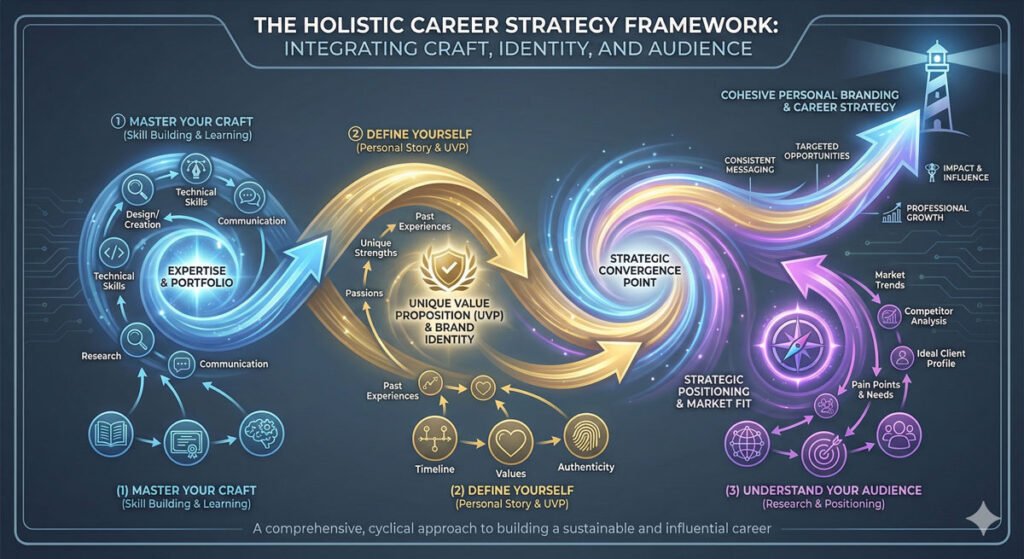
You’ve mastered your craft. You’ve defined yourself with clarity and authenticity. Now comes the final critical piece: understanding your audience.
Your portfolio and case studies aren’t created in a vacuum. They’re created for a specific person—the hiring manager, start-up recruiter, product leader or client who will review your work. Understanding that person, what they care about and what problems they’re trying to solve is essential to positioning yourself effectively.
This final article in the series covers the third critical area for breaking into product design: understanding your audience and strategically positioning yourself as the ideal candidate for the opportunities you want.
Step 1: Niche Down and Define Your Target Industry
Step 1: Niche Down and Define Your Target Industry
First and most important: choose an industry. This isn’t forever—you can pivot later. But for building a compelling portfolio, you need to focus. Companies are looking for designers who understand their specific domain.
Industries to Consider:
HealthTech – Designing for patients, providers, and healthcare systems
SaaS/Enterprise – Software for business operations and workflows
Social/Community – Social networks, community platforms, communication
Creator Economy – Tools for content creators, artists, influencers
AI/ML Applications – Consumer or enterprise applications of artificial intelligence
Choose an industry because:
You have genuine interest in it
You have domain knowledge or can develop it
You can access users and understand their problems
You’re excited about its future impact
Your industry choice guides everything that follows.
Step 2: Research Your Audience Before Creating Projects
Step 2: Research Your Audience Before Creating Projects
Most designers create their projects in isolation, then try to figure out who to market them to. Do the opposite.
Research your audience BEFORE you invest significant time in creating case studies. Here’s why: once you understand the specific problems your audience faces, you can create projects and case studies that speak directly to those problems.
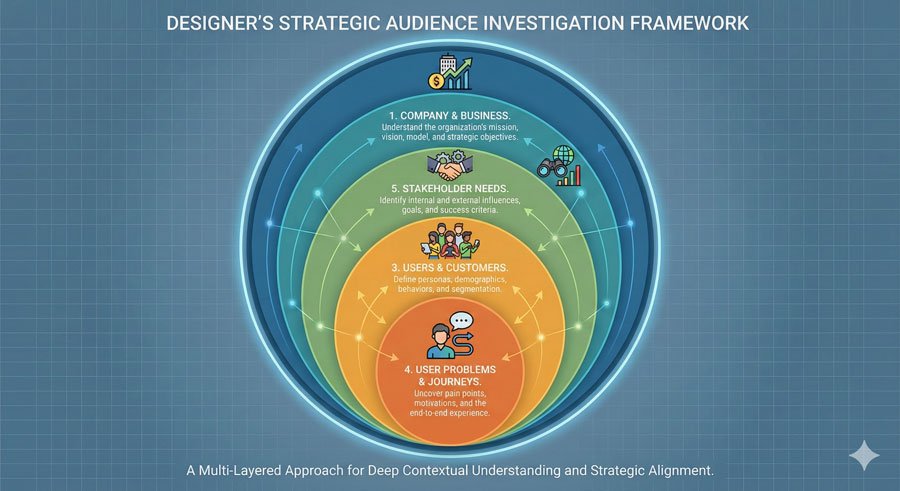
Understanding the Hiring Manager’s Perspective
Put on the lens of a hiring manager or recruiter. Ask yourself:
About the Company:
What industry are they in?
What stage are they at (early, growth, mature)?
What’s their business model?
Who are their users/customers?
About Their Problems:
What problems are they trying to solve?
What are their competitive challenges?
What’s their biggest technical or user experience challenge?
What kind of designer would help them win?
About Their Users:
Who are the end users of their product?
What problems do those users face?
What’s the user’s journey?
The B2B/B2C Complexity
Here’s something often overlooked in bootcamp education: many companies have competing stakeholder groups.
Example: An elderly care platform might have:
B2C Users (Primary): Elderly patients struggling to find quality in-home care
B2B Customers (Payer): Medicare/insurance companies paying the platform to provide this service
As a designer, you need to understand BOTH problem sets. Can you show that you grasp how the patient needs in-home care, but Medicare needs cost-effective service delivery? Can you show that you understand the tension between these two constituencies and can design solutions that serve both?
This deeper understanding is what separates designers who get hired for commodity roles from designers who get hired to lead design in strategic areas.
Step 3: Create Targeted Projects That Demonstrate Perfect Fit
Step 3: Create Targeted Projects That Demonstrate Perfect Fit
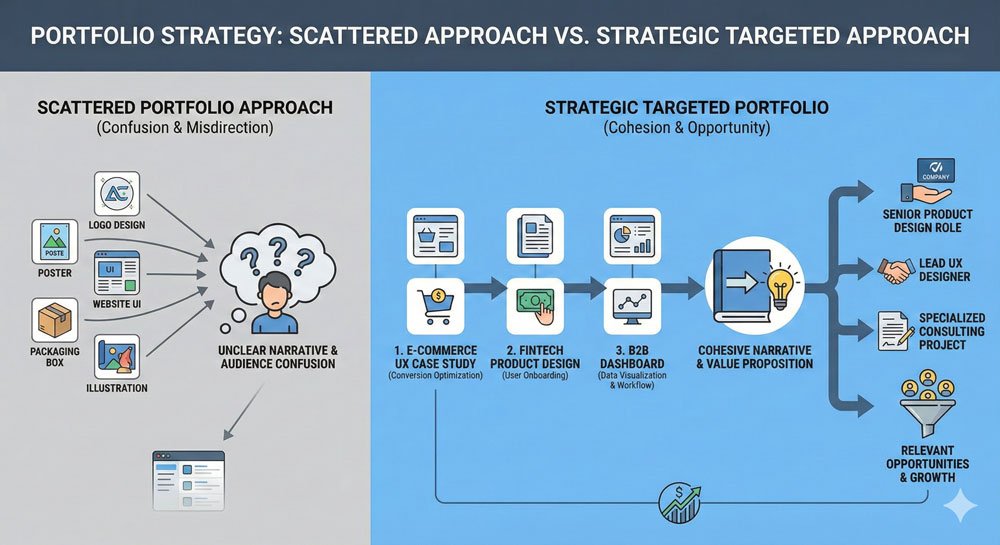
Here’s the key principle: do not create random design challenges or practice projects for your portfolio.
Sure, practice with challenges and projects while you’re learning. But when you create case studies, be strategic and intentional. Every project should demonstrate that you’re the ideal fit for the types of roles you want.
This is where your research becomes actionable.
Strategic Project Questions:
Does this project address a real problem in my target industry?
Does it showcase my unique perspective and approach?
Does it demonstrate that I understand both business goals AND user needs?
Could a hiring manager in this industry see themselves in this project?
Does it showcase skills that are in demand in this specific industry?
Creating even three to four strong, targeted case studies is far more effective than ten generic ones.
The Time Investment Reality:
A truly strong case study takes significant time to create—often 40-60 hours of work (research, design, iteration, documentation, writing). That’s why you can’t create ten of them. Be selective. Be intentional.
Showing ROI and Business Value
Showing ROI and Business Value
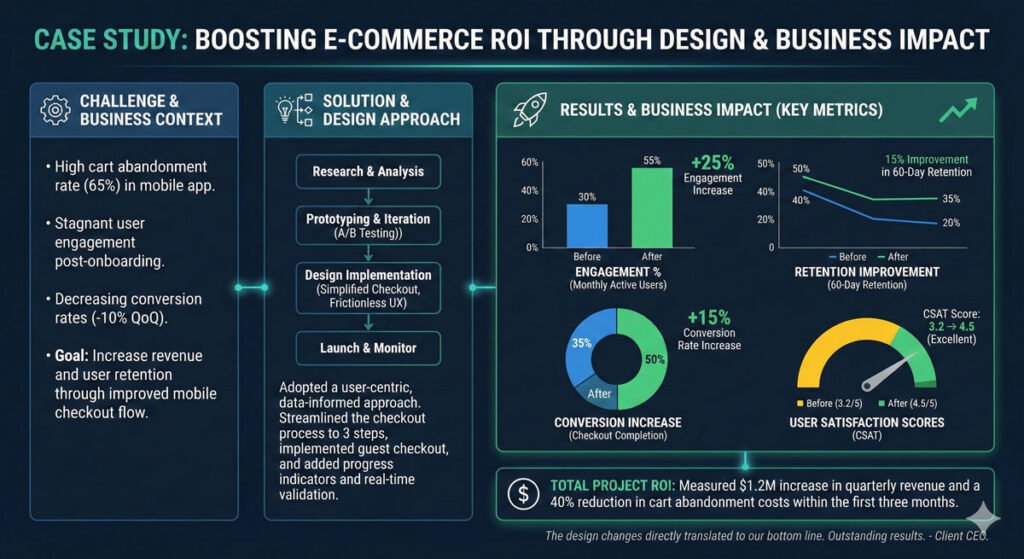
This is critical and often overlooked: companies want to know what return they get on investing in you as a designer. Your case studies should articulate the following:
The Business Impact
Did engagement increase? By how much?
Did user retention improve? By what percentage?
Did conversion rates improve?
Did customer satisfaction scores increase?
Did you reduce support tickets?
Did you accelerate task completion?
Where possible, use numbers. “Improved user satisfaction” is vague. “Improved task completion time from 8 minutes to 3 minutes” is concrete and compelling.
The Process Impact
Did you reduce design-to-development time?
Did you increase team efficiency?
Did you improve cross-team collaboration?
Did you create reusable systems that accelerated future work?
The Strategic Impact
Did your design work help achieve a business goal?
Did you identify a new market opportunity?
Did you solve a competitive problem?
Did you position the product differently in the market?
This business acumen is huge, especially in interviews. It demonstrates that you’re not just a maker of pretty interfaces—you’re a strategic partner who understands that design is an investment, not an expense.
Alignment Framework: Making Sure Everything Matches
Alignment Framework: Making Sure Everything Matches
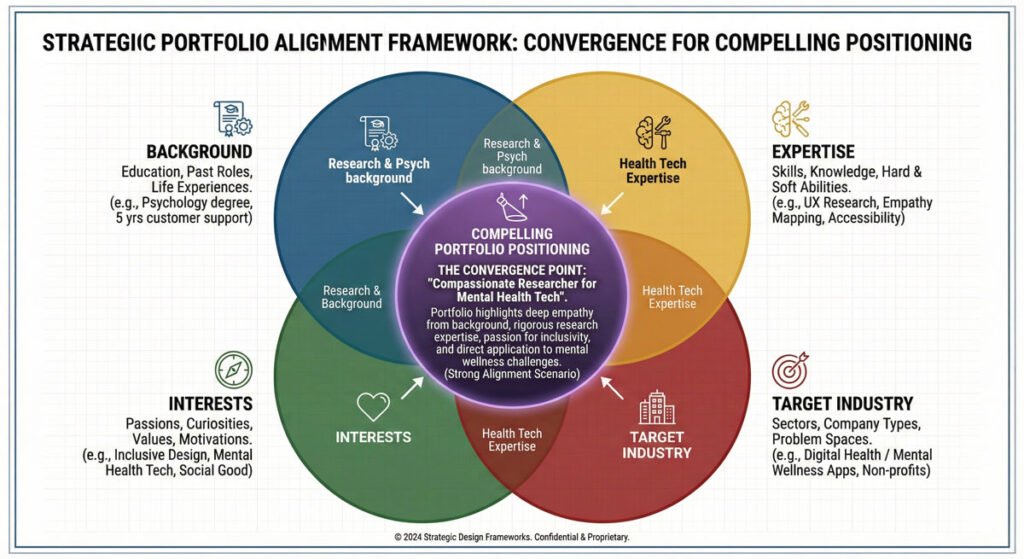
The goal of your entire portfolio strategy is alignment:
Your background + Your expertise + Your interests + The industry you want to work in = The needs of companies looking to invest in a designer
When these align perfectly, opportunities follow. When they don’t align, you face rejection or worse—getting hired for the wrong role.
Creating Your Personal Alignment Statement
Work through this framework:
1. Your Background and Strengths
What unique experience do you bring?
What are your genuine strengths?
What comes naturally to you?
2. Your Interests and Passion
What problems get you excited?
What industries align with your values?
Where do you want to make impact?
3. Your Target Industry and Audience
Which industry(ies) are you targeting?
What companies in that industry do you want to work with?
What problems are they trying to solve?
What designer qualities do they need?
4. Your Positioning
What makes you the perfect fit for this industry?
How does your background uniquely position you for these problems?
What can you bring to the table that few other designers can?
5. Your Portfolio Projects
Do your projects demonstrate mastery of problems in this industry?
Do they show you understand the user base?
Do they show you understand business context?
Do they collectively tell a story of alignment?
Industry Deep Dive: Case Study in Positioning
Industry Deep Dive: Case Study in Positioning
Let’s use elderly care technology as a concrete example.
The Industry Context
Elderly care technology is addressing a massive demographic shift. As populations age globally, there’s unprecedented need for technology supporting elder care delivery, caregiver management, and family communication.
The Audience Profile
Hiring Manager Profile:
Works at a healthtech startup focused on elderly care
Trying to improve either: (a) user experience for elderly patients, (b) operational efficiency for care providers, or (c) family coordination
Frustrated with current products being too complex for elderly users
Looking for a designer who understands elderly populations AND healthcare operations
Perfect Fit Designer Profile
A designer with:
Background in healthcare OR elderly care
Understanding of aging population psychology and needs
Experience designing for less tech-savvy users
Understanding of healthcare compliance and regulations
Ability to balance accessibility with modern design
Genuine interest in elder wellness
Portfolio Strategy for This Industry
Projects should demonstrate:
One end-to-end project designing an app or system for elderly users, showing accessibility thinking, simplicity, and deep user understanding
User research documentation showing you understand elderly users’ needs, pain points, and behaviors (not stereotypes)
One project showing healthcare/provider workflows understanding the operational side
Case study articulating ROI – show how improved UX increased adoption among elderly users or improved health outcomes
This portfolio tells a coherent story: “I understand elderly populations, I understand healthcare, I can design for accessibility, and I’m genuinely passionate about this problem space.”
The Power of Strategic Clarity
When you’ve done this work—when you know your industry, understand your audience, have researched their specific problems, and created targeted projects—something shifts.
You’re no longer hoping to get noticed. You’re strategically positioned to be exactly what companies are looking for. You’re no longer one of a thousand generic designers—you’re a specific, deliberate choice.
Companies and hiring managers can feel that alignment. It comes through in your work, your case studies, your resume, and your interviews. And it leads to better opportunities, better jobs, and a more fulfilling career because you’re working on problems you genuinely care about in industries where you can add real value.
Putting It All Together: The Three Critical Areas
Putting It All Together: The Three Critical Areas
Let’s recap the three critical areas you’ve now mastered:
1. Master Your Craft
Learn systematically with awareness of your learning style
Build strong foundational knowledge
Practice through real projects
Work on your weaknesses
Understand all the disciplines, methodologies, and soft skills required
2. Define Yourself
Know your unique background and transferable skills
Tell compelling stories about your work
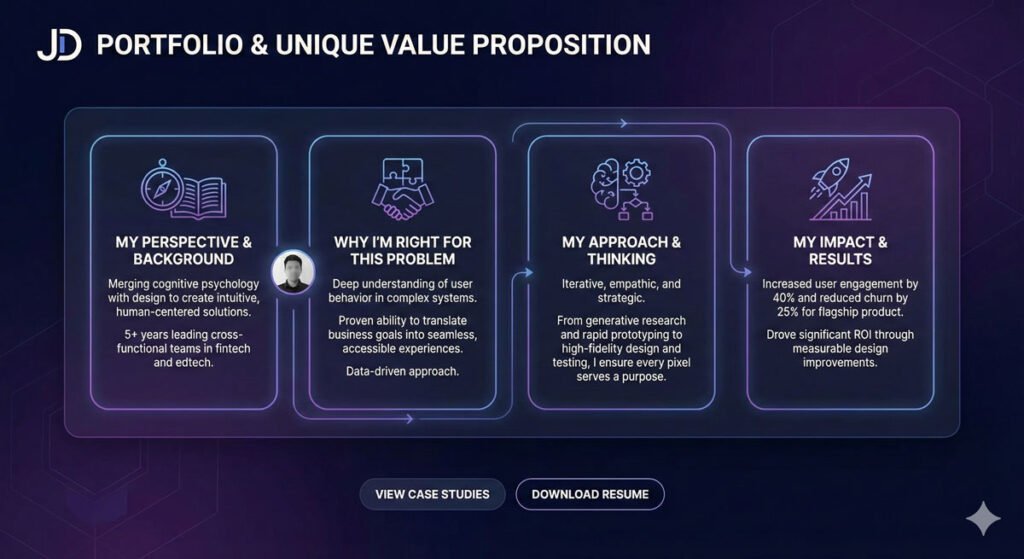
Articulate your unique value proposition
Show honest process and outcomes
Embrace the paradox of specificity
3. Understand Your Audience
Choose a target industry strategically
Research companies and hiring managers
Understand their problems and needs
Create targeted projects that demonstrate perfect fit
Show ROI and business value
Achieve alignment between who you are and what companies need
The Foundation for Long-Term Career Success
This three-part framework isn’t just for getting your first product design job. It’s the foundation for building a long-term, sustainable, fulfilling design career.
Designers who follow this approach:
Get hired for better roles at better companies
Command higher compensation
Work on problems they’re genuinely passionate about
Build distinctive expertise and reputation
Create more impact through their work
Enjoy greater career satisfaction
Next Steps: Building Your Design Career
Now that you understand the complete framework, here’s what to do:
Immediate Actions:
Assess Your Craft – Honestly evaluate where you are in mastering design fundamentals
Choose Your Path – Decide how you’ll develop your skills (bootcamp, courses, mentorship, self-directed)
Reflect on Identity – Complete the exercises to understand your background, skills, and interests
Research Your Industry – Pick one or two industries that excite you and begin research
Plan Your Portfolio – Map out 2-3 strategic projects that demonstrate perfect fit
Medium-Term (3-6 months):
Execute Projects – Create 3-4 strong case studies demonstrating your positioning
Build Your Portfolio – Document your work compellingly
Network Strategically – Connect with people in your target industry
Refine Your Story – Practice articulating your unique value proposition
Long-Term (6-12 months):
Build Your Platform – Create content or resources in your niche
Develop Thought Leadership – Share insights about your industry
Create Opportunities – Reach out directly to companies that align with your positioning
Iterate and Evolve – Continuously refine your positioning based on feedback and learning
Conclusion: You’re Ready to Build Your Design Career
The journey to becoming a successful product designer isn’t mysterious or complicated. It’s systematic. It’s intentional. And it’s absolutely achievable.
By mastering your craft, defining yourself authentically, and understanding your audience strategically, you position yourself not just to get a job as a product designer, but to build a distinctive, fulfilling, impactful career.
The designers who succeed aren’t just the most talented. They’re the ones who are intentional, strategic, and clear about who they are and what value they bring.
They’re the ones who understand that design is about solving real problems for real people—and they position themselves to do exactly that.
You have everything you need. Now go build your design career.
About the Author
Lalit M. S. Adhikari is a Digital Nomad and Educator since 2009 in design education, graphic design and animation. He’s taught 500+ students and created 200+ educational articles on design topics. His teaching approach emphasizes clarity, practical application and helping learners.
Defining Yourself: Crafting Your Unique Value Proposition as a Product Designer
Learn how to define yourself as a product designer by leveraging your unique background, telling your story and building a compelling portfolio that showcases your value.
Table of Contents
Introduction: You Are More Than Your Skills
Introduction: You Are More Than Your Skills
You’ve learned the disciplines, practiced the methodologies, and built your foundational knowledge in product design. But here’s what many designers miss: having great skills is necessary but not sufficient.
What sets you apart isn’t just what you can do—it’s who you are, where you’ve been, and the unique perspective you bring to the problems you solve.
This is the second critical area for breaking into product design: defining yourself. This goes beyond creating a resume or portfolio.
It’s about understanding and articulating your unique value, the story behind your work, and why companies should invest in you specifically.
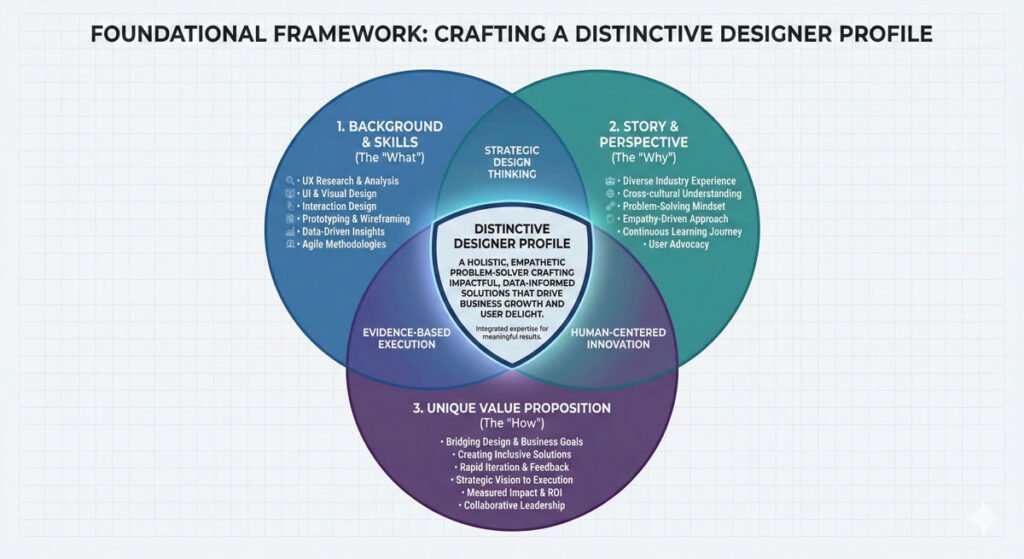
To effectively define yourself as a product designer, you need to work through three interconnected dimensions:
Be Specific – Know your background, skills, and what gets you excited
Tell Your Story – Communicate how you leverage your unique background in your work
Show Your UVP – Demonstrate what makes you uniquely good at this work
Pillar 1: Be Specific About Who You Are
The first step is understanding and articulating your specific background, skills, and interests. This isn’t vanity—it’s strategic clarity.
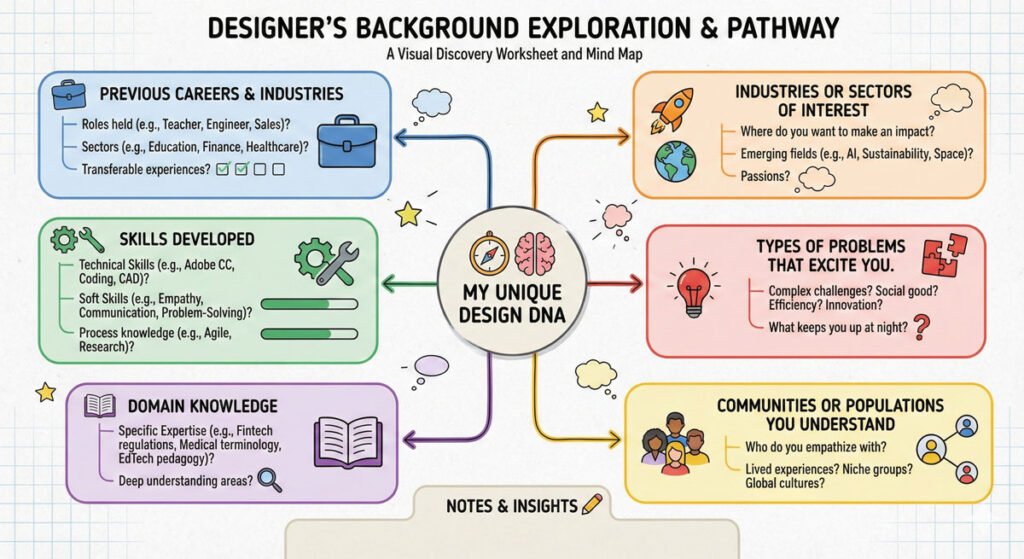
Understanding Your Background and Transferable Skills
Reflect on these questions:
What was I doing before product design? What industry or field?
What skills did I develop in those previous roles?
What type of problems did I solve?
What knowledge do I have that most designers don’t?
Your background isn’t a liability—it’s an asset. If you come from marketing, you understand customer acquisition and retention.
If you come from psychology, you understand human behavior deeply. If you come from engineering, you understand technical constraints. If you come from business, you understand strategy and revenue models.
The Competitive Advantage of Diverse Backgrounds:
Designers with diverse backgrounds often outperform those with design-only backgrounds because they bring different perspectives, problem-solving approaches, and domain knowledge. You’re not trying to erase your previous experience—you’re leveraging it.
Identifying Your Areas of Familiarity and Interest
Identifying Your Areas of Familiarity and Interest
Critical question: What type of people, markets, or industries do you have the most familiarity or interest in? This matters more than many designers realize. Here’s why:
Knowledge Gaps Cost Time and Energy – If you choose an industry unfamiliar to you, be prepared to spend significant time researching industry-specific knowledge, terminology, and user pain points that an insider would already understand.
Daily Work Aligns with Interest – You need to be honest about what kinds of problems excite you. If you don’t like working on shopping carts and checkout flows, don’t pursue e-commerce design, no matter how lucrative it seems. You’ll spend your career unhappy.
Industry Insiders Have Advantages – A designer with healthcare background designing healthcare products understands patient workflows, regulatory constraints, and provider needs intuitively. That’s valuable.
Be Honest About Your Interests and Constraints
Some designers are attracted to fintech because it’s trendy and lucrative. Others are drawn to healthcare because they want to create positive health impact. Still others are excited about environmental and sustainability tech because they care about climate change.
All of these are valid. But here’s the key: be authentic. Your genuine interest shows in your work. Your authentic passion for a problem area will drive you to do deeper research, create more thoughtful solutions, and ultimately create a stronger portfolio.
Equally important is being honest about constraints. You might be interested in complex B2B enterprise software, but if you struggle with large information systems and prefer simple, intuitive interfaces, you’ll be frustrated. Understanding your genuine preferences prevents years of career misalignment.
Pillar 2: Tell Your Story
Having skills and background is one thing. Communicating how you leverage your unique background and interests to inform your work is what makes you memorable and compelling.
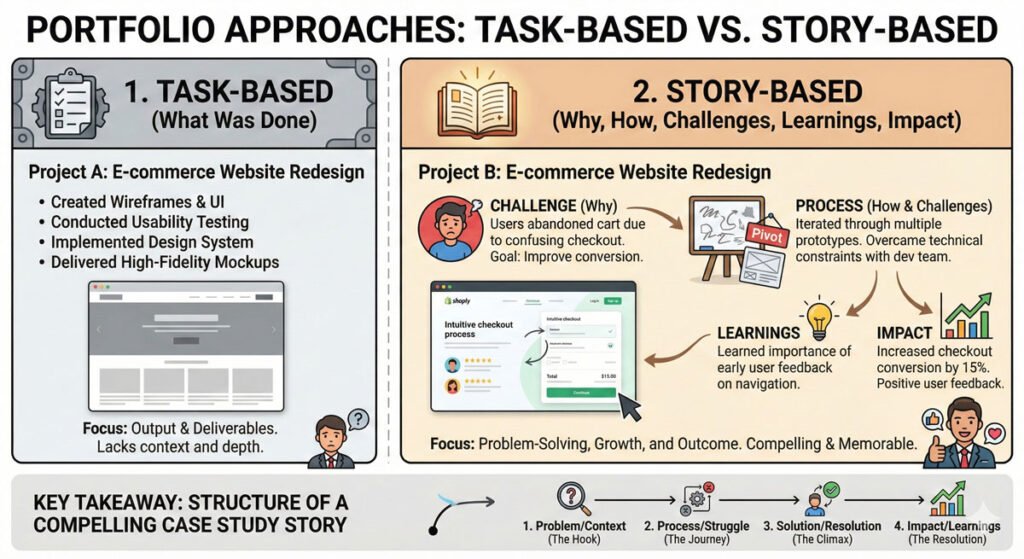
The Difference Between Listing Tasks and Telling Your Story
The Difference Between Listing Tasks and Telling Your Story
Most designers’ portfolios look the same: they show a project, list the features, mention the tools used, and show the final design. These portfolios are forgettable.
What stands out is storytelling. Instead of just listing tasks, show:
Why you approached the problem the way you did
How your unique background informed your approach
What challenges you faced and how you overcame them
What you learned and how it changed your thinking
What the actual outcome or impact was
This transforms your portfolio from a documentation of work into a narrative about your thinking, your approach and your impact.
Key Elements of Your Story
Context and Background Start by setting the scene. What was the situation? What company or problem were you addressing? What was the state of things before your work
The Challenge What was the core problem or opportunity? Why was this challenging? What constraints did you face? What made this problem worth solving?
Your Unique Approach Here’s where your background and perspective shine. How did you approach this differently? What unique insight or experience did you bring? What was your process?
The Work and Decisions Walk through your work process. Show key decisions and why you made them. This is where you demonstrate your thinking—not just your execution skills.
The Outcome and Impact What was the result? Quantify impact where possible (increased engagement, improved retention, faster task completion). But also talk about qualitative impact—user satisfaction, business value, or problem solved.
What You Learned Reflect on the experience. What did you learn? How did this project change your thinking about design? What would you do differently if you did it again?
This structure creates a narrative arc that’s compelling, memorable, and showcases your thinking process.
Getting Specific: Your Personal UVP
Getting Specific: Your Personal UVP
UVP stands for “Unique Value Proposition”—what makes you specifically good at this type of work, doing it in your way?
This isn’t about false modesty or excessive self-promotion. It’s about clarity. What can you do, or how can you approach problems, that’s distinctive because of your background?
Examples:
A designer with a psychology degree who designs mental health apps understands the nuances of user psychology in ways a typical designer might not
A designer with e-commerce experience can optimize checkout flows and understand conversion metrics deeply
A designer with accessibility needs (or who cares about accessibility) will create more inclusive products
A designer from a non-Western background brings cultural perspectives that create products usable globally
Your UVP isn’t about being “the best” at something. It’s about being distinctively good at something specific because of who you are and what you bring to the table.
Pillar 3: Show Your Process and Outcomes
Show Your Process and Outcomes
Employers and clients don’t just want to see final designs. They want to understand how you think and whether you’ll create value for their organization.
Beyond the “Final Design”
Your portfolio needs to show:
Your Research Process – How did you understand the problem? What user research did you conduct? What insights did you uncover?
Your Ideation and Iteration – Don’t just show the final design. Show early sketches, explorations, and multiple directions. This demonstrates you’re thoughtful, iterative, and willing to explore options.
Design Decisions – For key screens or features, explain why you designed it that way. What problem does it solve? How does it align with user needs and business goals?
Collaboration – Show how you worked with engineers, product managers, and other stakeholders. How did you incorporate feedback? How did you navigate constraints?
Testing and Validation – Did you usability test? What did you learn? How did you iterate based on feedback?
Results and Impact – What happened after you shipped the work? Did engagement improve? Did user satisfaction increase? Did the business metric move?
This comprehensive approach demonstrates that you’re not just a visual designer—you’re a strategic thinker who understands the entire product development process.
The Importance of Honest Challenges and Learnings
Here’s something many designers miss: showing challenges and what you learned is actually MORE compelling than pretending everything went perfectly.
Real case studies include:
“I initially approached this problem with X solution, but user testing revealed it didn’t align with user mental models. We pivoted to Y.”
“We faced technical constraints that prevented our ideal solution. Here’s how we worked within constraints to still deliver value.”
“In retrospect, I would have conducted more research upfront before jumping to solutions. Here’s what I learned.”
Honesty about challenges and your learning process shows maturity, self-awareness, and the ability to iterate—all highly valued in product design.
The Paradox of Specificity: How Narrowing Actually Expands Opportunity
The Paradox of Specificity: How Narrowing Actually Expands Opportunity
Here’s one of the most counterintuitive yet important principles in building a design career:
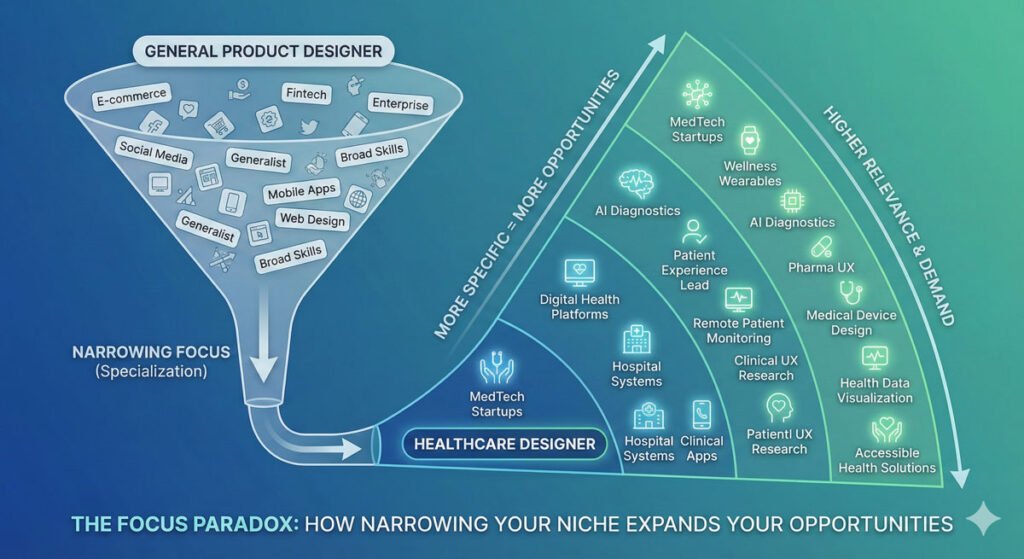
“The more specific your goal, the more opportunities you’ll create for yourself. Narrowing your aperture can expand your horizons.”
This paradox is crucial to understand. Many designers try to position themselves as “generalist product designers” who can work on anything. While that seems like a safe strategy, it’s actually limiting.
Why Specificity Creates Opportunity
You’re More Memorable If you say “I’m a product designer,” you’re one of thousands. If you say “I’m a product designer specializing in healthcare technology,” you’re distinctive.
You Attract the Right Opportunities Companies looking for healthcare designers will find you. They won’t waste your time, and you won’t waste theirs on wrong-fit opportunities.
You Build Deeper Expertise By focusing on one industry or problem type, you become expert in that domain faster than generalists. This expertise makes you valuable.
You Create a Virtuous Cycle First healthcare project → stronger healthcare portfolio → attract more healthcare opportunities → build deeper healthcare expertise → become highly specialized → become highly valuable
You Network More Strategically In a specific industry, you build deep relationships with key people—other designers, product leaders, executives. This network becomes your greatest asset.
The paradox is real: specificity doesn’t limit opportunity, it multiplies it.
Putting It Together: Your Personal Definition Statement
By working through these three pillars, you should be able to create a personal definition statement—something like:
“I’m a product designer bringing [unique perspective/background] to [specific industry or problem type]. My approach combines [your distinctive methodology or process] with [your key strength or differentiator], resulting in [the type of impact you create].”
This definition statement becomes the core of your portfolio, your case studies, your resume, and your pitch. It clarifies for both yourself and potential employers exactly what value you bring.
Conclusion: Defining Yourself is Strategic Clarity
Defining yourself isn’t about being restrictive or pigeonholing yourself. It’s about strategic clarity that actually opens doors rather than closing them.
The most successful designers aren’t generalists playing it safe. They’re specialists who understand their unique value and communicate it clearly. They know their background matters. They tell compelling stories about their work. They show honest processes and real outcomes.
In the final article of this series, we’ll explore the third critical area: Understanding Your Audience. You’ll learn how to research hiring managers, companies, and industries, then strategically position yourself as the ideal candidate for the opportunities you want.
About the Author
Lalit M. S. Adhikari is a Digital Nomad and Educator since 2009 in design education, graphic design and animation. He’s taught 500+ students and created 200+ educational articles on design topics. His teaching approach emphasizes clarity, practical application and helping learners.
The Three Critical Areas for Breaking Into Product Design: Master Your Craft
Learn the three critical areas for breaking into product design: mastering your craft and understanding your audience. Complete guide with actionable strategies.
Table of Contents
Introduction: The Three Pillars of Transitioning Into Product Design
Introduction: The Three Pillars of Transitioning Into Product Design
You’ve decided you want to become a product designer. You’ve researched the industry, understood the landscape, and now you’re ready to take action.
But where do you start? How do you make the actual transition and carve out a meaningful space for yourself in this competitive industry?
The answer lies in three interconnected areas that must work together: mastering your craft, gaining clarity around yourself, and defining your audience.
This article focuses on the first and most foundational area—mastering your craft—which involves learning new skills, improving existing ones, and building a deep understanding of the disciplines that make up product design.
Master Your Craft: The Foundation of Your Design Career
Mastering your craft is not a destination—it’s an ongoing process of learning new skills, refining existing ones, and constantly evolving your abilities as a designer.
The product design field is multifaceted, and no designer knows everything. What matters is developing a systematic approach to learning and improvement.
Step 1: Assess Your Skill Level and Choose Your Mode of Study
Assess Your Skill Level and Choose Your Mode of Study
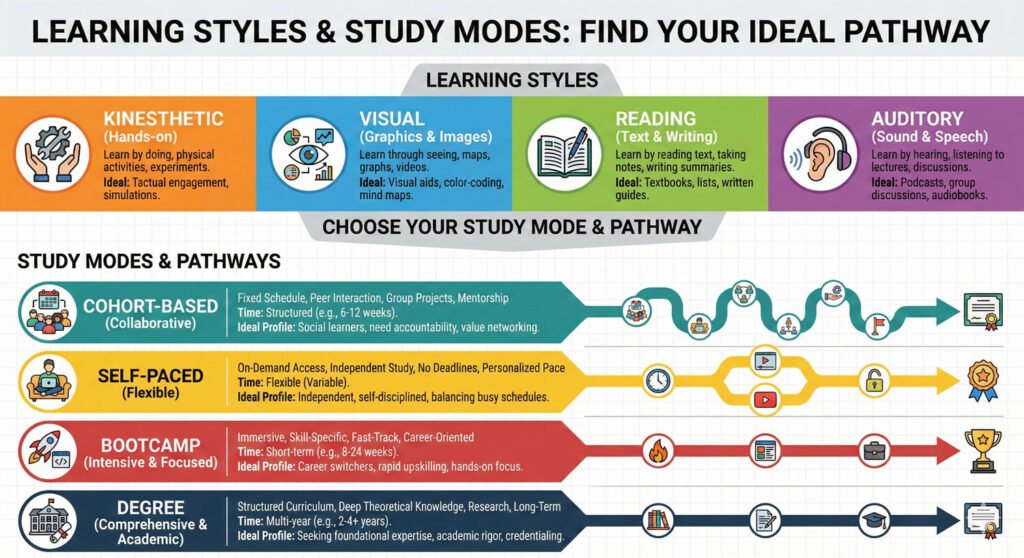
Before jumping into learning, you need to understand how you learn best. Everyone has different learning styles, and recognizing yours will accelerate your progress and keep you motivated.
Different Learning Styles:
Kinesthetic Learners – You learn best by doing. Hands-on projects, interactive tools, and real-world application are your strengths.
Visual Learners – You absorb information best through videos, diagrams, illustrations, and visual demonstrations.
Reading/Writing Learners – You prefer articles, books, documentation, and written explanations.
Auditory Learners – You benefit from podcasts, lectures, conversations, and verbal explanations.
Most designers benefit from a mixed approach, but identifying where you excel helps you build an efficient learning system.
Assessment Questions to Ask Yourself:
What skills do you already possess? Are you coming from a design background, or are you transitioning from another field?
Where are your blind spots? What areas of design do you find most challenging?
How much time can you dedicate to learning? Do you have the flexibility for full-time cohort-based programs, or do you need self-paced learning around work and family commitments?
Choosing Your Study Path:
Cohort-Based Programs – Accelerated learning with deadlines, community support, and structured curriculum. Best if you can commit 40+ hours per week.
Self-Paced Online Courses – Flexibility to learn around your schedule. Best if you’re working full-time or have other commitments.
Bootcamps – Intensive, focused programs that combine learning with project work. Best if you want rapid career transition.
Degree Programs – Comprehensive academic training. Best if you want deep theoretical knowledge alongside practical skills.
Hybrid Approach – Combine free resources with paid courses. Most cost-effective for the self-directed learner.
Step 2: Find Guidance You Trust
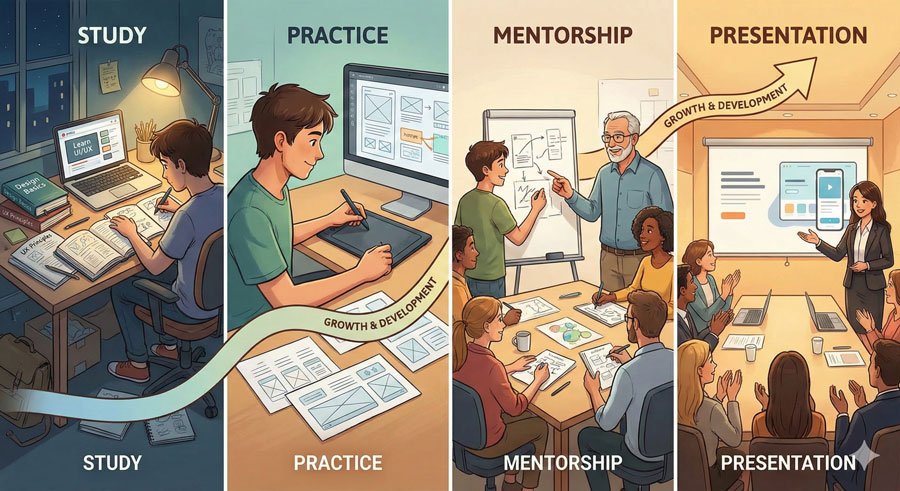
Learning in isolation is difficult. Finding trusted guidance—whether from practitioners, mentors, instructors, or professionals you admire—can dramatically accelerate your growth and provide clarity when you’re confused.
Types of Guidance to Seek
Mentors – Experienced designers who guide your development, provide feedback, and help you navigate challenges
Instructors – Educators who teach structured curriculum and formal design education
Practitioners – Working designers whose work you admire, whose content you study, and from whom you learn through their case studies and documentation
Communities – Design communities, study groups, and professional networks where you can learn from peers
Choosing the Right Guide
When seeking guidance, prioritize finding individuals who:
Align with your values and aspirations
Encourage and support who you are while pushing you to grow
Are actively working in areas that interest you
Have a teaching philosophy that resonates with your learning style
Demonstrate the kind of career or impact you want to create
Don’t be passive in this relationship. Actively seek out wisdom, ask thoughtful questions, and absorb everything you can learn from them.
Step 3: Make Sure You Have Solid Foundations
Make Sure You Have Solid Foundations
Many self-taught or fast-tracked designers skip or glaze over fundamental design principles. This is a critical mistake that limits your growth ceiling.
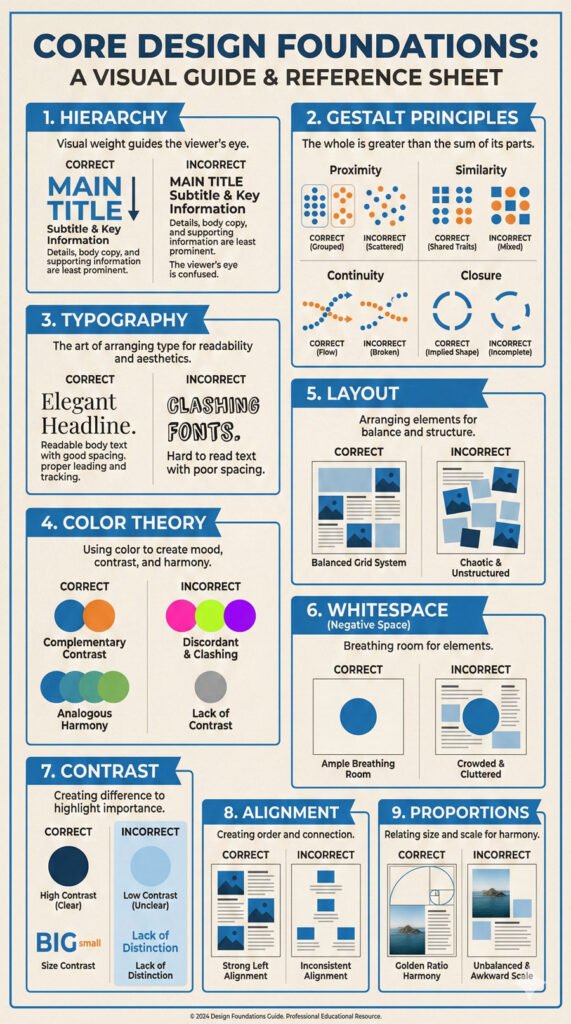
Core Design Foundations You Must Master
Hierarchy – Understanding how to organize information so the most important elements are perceived first
Gestalt Principles – How humans naturally perceive and organize visual elements
Typography – The art and science of typeface selection, sizing, spacing, and arrangement
Color Theory – How colors interact, the psychology of color, and how to create effective color systems
Layout and Composition – How to arrange elements on a canvas to guide user attention
Whitespace – The strategic use of empty space to create balance and focus
Contrast – How to use differences to create visual interest and hierarchy
Alignment – Organizing elements for visual coherence and professionalism
Proportions and Ratios – Creating balanced, aesthetically pleasing relationships between elements
If you’re uncertain about any of these fundamentals, go back and dial them in. Spend time with design books, take focused courses, and practice applying these principles to real work.
Strong foundations are like concrete in a building—everything else is built on top of them.
Step 4: Apply Them to Projects
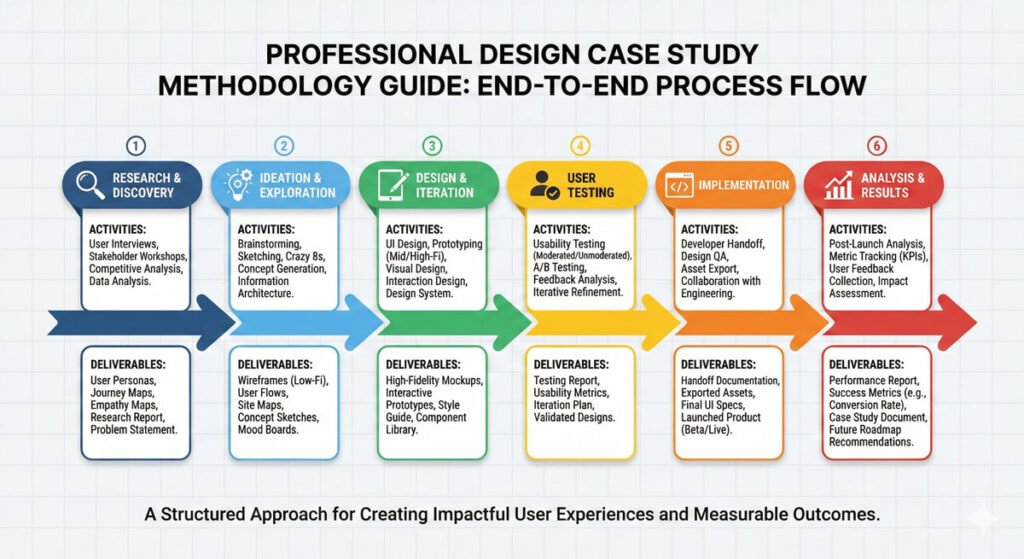
Learning theory is important, but application is where real learning happens. You must design products from start to finish, going through all the layers of the product design model we discussed in the previous article.
Why Full Product Projects Matter:
They help you see your strengths and weaknesses more clearly
They give you real portfolio work that demonstrates your capabilities
They teach you about dependencies and how different layers connect
They simulate real-world constraints and decision-making
Project Types to Include in Your Portfolio:
At least one end-to-end product design project (from strategy through visual design)
Projects that showcase different product stages (early, mid, late-stage challenges)
Projects that demonstrate different product types (SaaS, mobile, marketplace, etc.)
At least one project from an industry you want to work in
The goal isn’t to have dozens of projects—quality far exceeds quantity. Better to have three deeply considered, well-documented projects than ten shallow ones.
Step 5: Practice the Skills You’re Weaker In
Practice the Skills You’re Weaker In
Here’s the truth: most designers avoid working on things they’re not good at. If you struggle with user research, you’ll naturally gravitate toward visual design. If interaction design intimidates you, you’ll focus on information architecture.
This is the opposite of what you should do.
Identify your skill gaps and put the majority of your learning time into those areas. This might feel uncomfortable, but discomfort is where growth happens.
After all, you already know how to do the things you’re good at—practicing them more won’t accelerate your development as much as addressing your weaknesses.
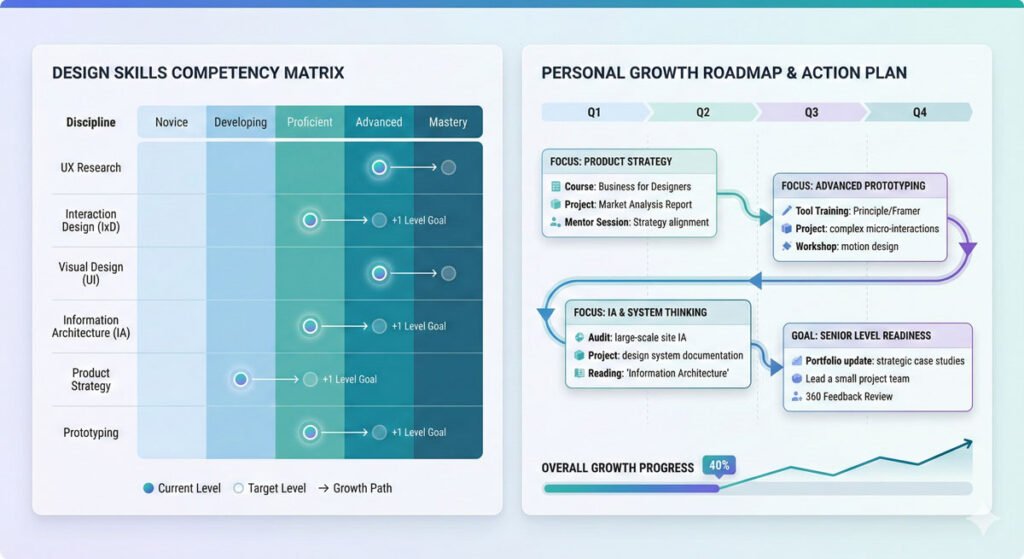
Create a personal skill audit:
List all the major disciplines in product design
Rate yourself in each from 1 (beginner) to 5 (expert)
Identify your three weakest areas
Create targeted learning plans for each
Build projects specifically to practice these skills
Step 6: Add New Skills as You Go
The product design field is constantly evolving. New tools emerge, methodologies change, and user expectations shift. The learning never stops.
Continuous Learning Strategies:
Follow industry leaders and designers doing work you admire
Subscribe to design newsletters and publications
Listen to design podcasts during commute time
Take one small course or tutorial per month on a new skill
Attend design conferences and webinars
Read case studies of products you use and admire
Join professional communities like AIGA, IxDA, or local design meetups
The key is consistency over intensity. Learning a little bit regularly is far more effective than cramming knowledge in sporadic bursts. You don’t have to do it all at once—much of your development will come naturally with practice and time.
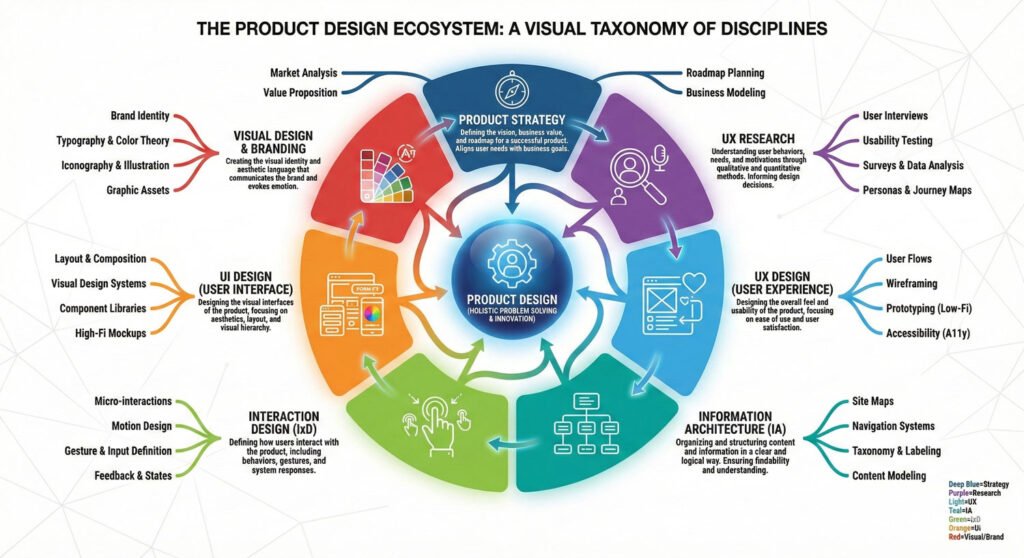
The Disciplines of Product Design: What You Need to Learn
The Disciplines of Product Design: What You Need to Learn
Now that you understand the meta-approach to learning, let’s explore the specific disciplines within product design that you need to master.
Core Disciplines in Product Design
1. User Experience Research (UXR)
Understanding users through research is the foundation of all good design. UX researchers use various methodologies to understand user behavior, needs, pain points, and mental models.
2. User Experience Design (UXD)
This encompasses the overall strategy and planning of how users interact with your product. UX designers focus on user flows, journey mapping, and the overall experience structure.
3. Visual Design and Branding
Visual designers create the aesthetic direction, visual systems, and brand identity that make products distinctive and memorable.
4. User Interface Design (UI)
UI designers focus on the specific screens, elements, and components that users interact with. They ensure clarity, consistency, and usability across all touchpoints.
5. Interaction Design (IxD)
Interaction designers define how the product responds to user actions—animations, transitions, feedback, and the dynamic behavior of interactive elements.
6. Information Architecture (IA)
Information architects organize and structure content and features in ways that make intuitive sense to users. They create sitemaps, taxonomies, and content hierarchies.
7. Product Strategy
Product strategists align design decisions with business goals. They understand market positioning, competitive landscapes and how design contributes to business success.
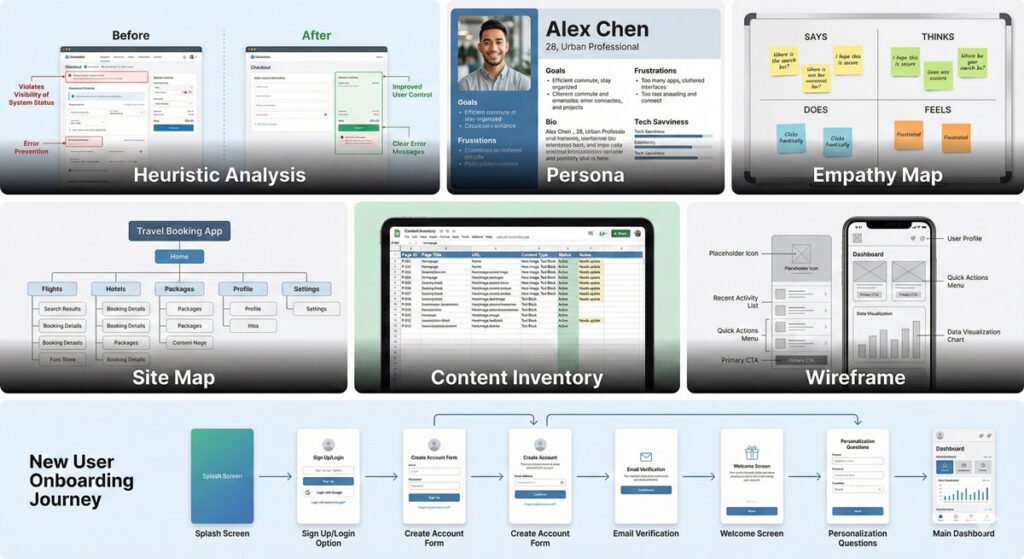
Key Deliverables You’ll Produce
As you work through projects and practice these disciplines, you’ll create specific deliverables that become part of your portfolio and demonstrate your capabilities:
Key Deliverables You’ll Produce
Common Deliverables Include:
Heuristic Analysis – Systematic evaluation of designs against established usability principles
Personas – Detailed profiles representing different user types and segments
Empathy Maps – Structured representations of user goals, emotions, behaviors, and pain points
Site Maps – Hierarchical diagrams showing how content and features are organized
Content Inventory – Comprehensive lists of all content and features in a product
Wireframes – Low-fidelity layouts showing structure and content without visual design
User Flows – Diagrams showing the paths users take to accomplish goals
Mastering the creation of these deliverables is essential because they’re how you communicate your thinking, document decisions, and demonstrate your process to employers and clients.
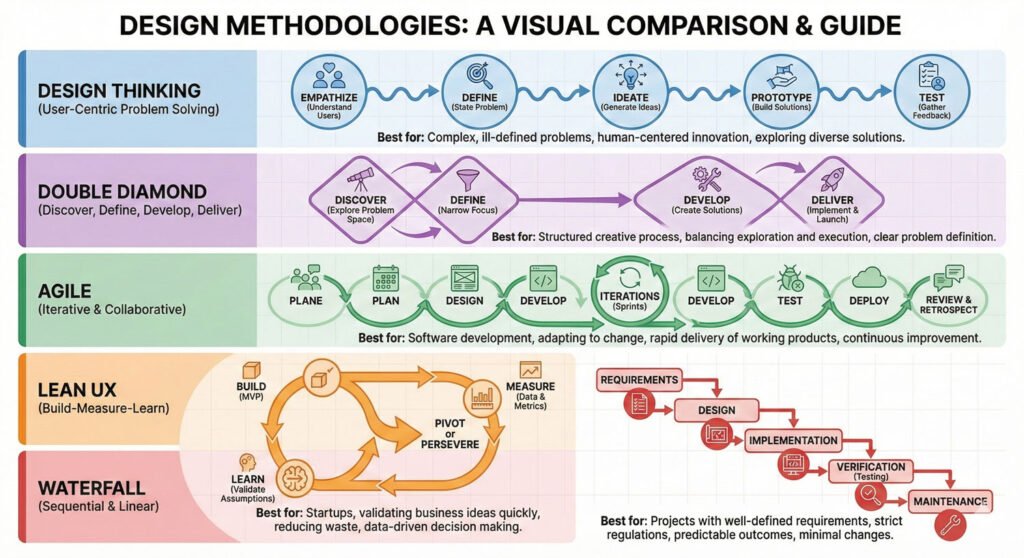
Methodologies: How Professional Designers Work
Methodologies: How Professional Designers Work
Beyond disciplines and deliverables, you need to understand the methodologies and processes that professional designers use to approach their work efficiently and systematically.
Design Thinking – The most common methodology for user-centered designers, consisting of five phases: Empathize, Define, Ideate, Prototype, and Test. This iterative cycle helps designers understand problems deeply and test solutions quickly.
Double Diamond – A four-phase model emphasizing exploration and narrowing: Discover, Define, Develop, and Deliver.
Agile – An iterative development methodology emphasizing flexibility, collaboration, and frequent feedback cycles.
Sprint Methodology – Time-boxed, intensive work periods focused on achieving specific goals.
Lean – An approach emphasizing building minimum viable products quickly and learning from user feedback.
Waterfall – A sequential approach where each phase is completed before moving to the next. Less common in design but still used in some organizations.
Understanding these methodologies helps you understand different organizational approaches to product development and allows you to adapt your process based on the context you’re working in.
The Often-Overlooked Dimension: Soft Skills
While hard skills (design tools, methodologies, disciplines) are important, soft skills often determine whether you thrive or merely survive in product design.
Critical Soft Skills for Product Designers:
Mindfulness – Working with awareness and intention about what you’re doing and why
Inclusion – Actively considering diverse perspectives, abilities, and backgrounds
Diversity – Valuing and incorporating different viewpoints and experiences
Cultural Sensitivity – Understanding and respecting cultural differences in how people use products
Accessibility – Designing for people with disabilities and different abilities
Cognitive Bias Awareness – Recognizing how your own biases influence design decisions
Psychology – Understanding human behavior, motivation, and decision-making
Communication – Articulating your design thinking clearly to stakeholders and teams
Presentation Skills – Effectively showcasing your work and selling your design decisions
These soft skills are often what differentiate good designers from great ones. A designer with strong soft skills can influence organization culture, make better decisions, and create more inclusive products.
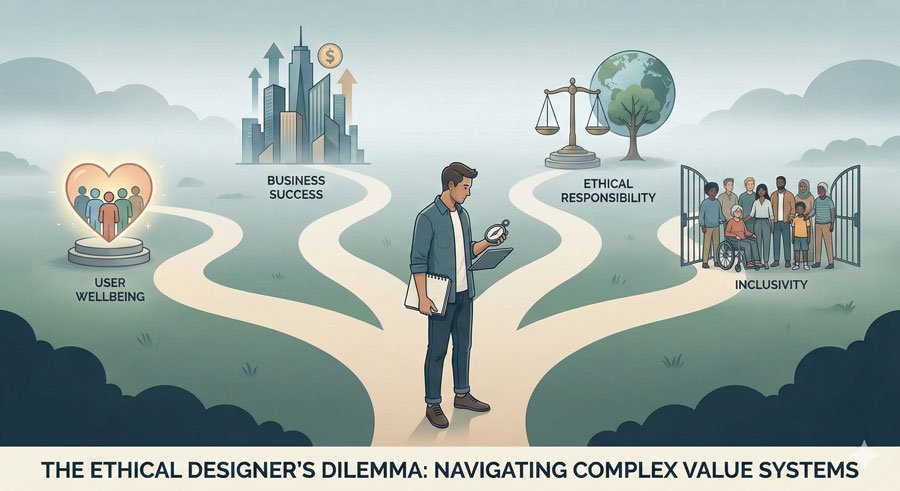
Ethical Considerations in Product Design
Ethical Considerations in Product Design
At the heart of DesignerUp’s philosophy is mindful design and ethical practice. As you build your career, you’ll face decisions where there’s no clear “right” answer.
Questions You’ll Face:
Do we sell user data to keep our business afloat, or do we make difficult business changes?
Do we prioritize profit or progress in our product decisions?
How do we balance business goals with user well-being?
What are we willing to compromise on, and what are we willing to turn a blind eye to?
These aren’t just philosophical questions—they directly impact the products you design and their effect on millions of people. As you develop your craft, also develop your ethical framework and your understanding of what kind of designer you want to be.
Conclusion: Mastering Your Craft is a Journey, Not a Destination
Mastering your craft in product design isn’t something you check off a list—it’s an ongoing commitment to learning, improving, and evolving throughout your career.
By following these six steps systematically, you’re not just acquiring skills; you’re building the foundation for a sustainable, fulfilling design career. The designers who thrive are those who:
Understand their learning style and create systems that work for them
Seek out trusted guidance and mentorship
Build strong foundational knowledge
Apply learning to real projects
Consistently work on their weaknesses
Never stop learning and evolving
In the next article of this series, we’ll move to the second critical area: Defining Yourself.
You’ll learn how to take everything you’ve learned about your craft and combine it with your unique background, values, and perspective to create a distinctive position in the market.
About the Author
Lalit M. S. Adhikari is a Digital Nomad and Educator since 2009 in design education, graphic design and animation. He’s taught 500+ students and created 200+ educational articles on design topics. His teaching approach emphasizes clarity, practical application and helping learners.
The Ultimate Guide to Becoming a Product Designer: Your Complete Career Roadmap
Ultimate guide to becoming a product designer. Learn career paths, skills needed, industry insights, and proven strategies to transition into product design successfully.
Table of Contents
Introduction: Why Product Design Matters Today
Introduction: Why Product Design Matters Today
In today’s digital landscape, product designers are the architects of experiences that millions of people use daily. Whether you’re considering a career shift or starting fresh, understanding what it takes to become a product designer is crucial.
This comprehensive guide will walk you through everything you need to know about the industry, the roles available, and the exact steps you can take to build a successful career as a product designer.
The field of product design has evolved from a niche specialization to one of the most in-demand careers in technology. Companies across industries—from fintech to healthcare to e-commerce—are actively seeking talented product designers who can solve complex user problems while balancing business objectives.
If you find yourself asking “How can I create or contribute to solutions that make more things better for more people?”—you’re already thinking like a designer.
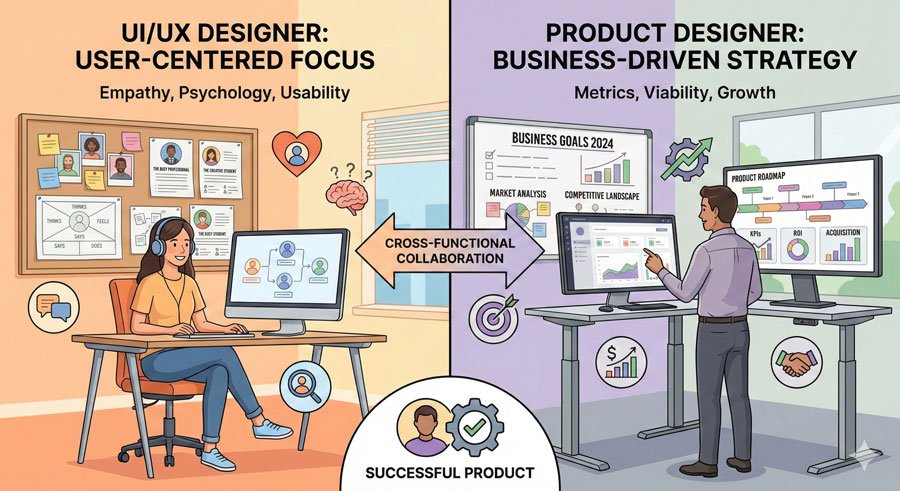
The Difference Between UI/UX Designer vs Product Designer
The Difference Between UI/UX Designer vs Product Designer
One of the most common questions aspiring designers ask is: “What’s the difference between a UI/UX Designer and a Product Designer?” While these terms are often used interchangeably, there are important distinctions that shape your career path and daily responsibilities.
UI/UX Designer: The User Advocate
A UI/UX Designer primarily acts as a user advocate first. Their core focus is on understanding users deeply and mapping visual symbols and interactions to users’ mental models and psychology.
These designers spend considerable time conducting user research, creating personas, and building empathetic solutions that truly resonate with the people using the product.
Product Designer: The Product Advocate
Conversely, a Product Designer functions as a product advocate first. Their primary focus lies in understanding business goals and translating them into features and user/customer journeys while navigating the constraints and requirements of the organization.
Product designers must balance user needs with business objectives and revenue goals, making them critical business strategists as well as creative professionals.
The key differentiator between these roles is their primary focus and where they spend their time. However, there’s significant overlap in tasks, duties, and disciplines. What truly matters is recognizing that both are essential to creating successful digital products.
Why Designer Means So Much More Than “Creative Professional”
The term “designer” has historically been associated with creative and visual professionals, but its meaning has evolved dramatically. Today, designers are visual strategists, digital storytellers, critical thinkers, artists, scientists, and problem solvers who create technology solutions.
This evolution is crucial to understand because it means that if you come from a technical background, or from business, marketing, or even unrelated fields, you have valuable skills to bring to product design.
You’re not just learning how to make things look pretty—you’re learning to solve complex problems using strategy, research, psychology, and creative thinking.
At the heart of professional product design is the concept of mindful design and interaction—doing everything with awareness and intention about what you’re doing and why you’re doing it.
This philosophical approach transforms designers from mere executors of ideas to strategic partners in creating meaningful products.
The Three Pillars of the Product Design Industry
The Three Pillars of the Product Design Industry
To understand where you’ll fit in the product design industry, you need to comprehend three interconnected dimensions that shape every digital product and every design role. These three pillars work together to create the unique requirements and skill sets for different job positions.
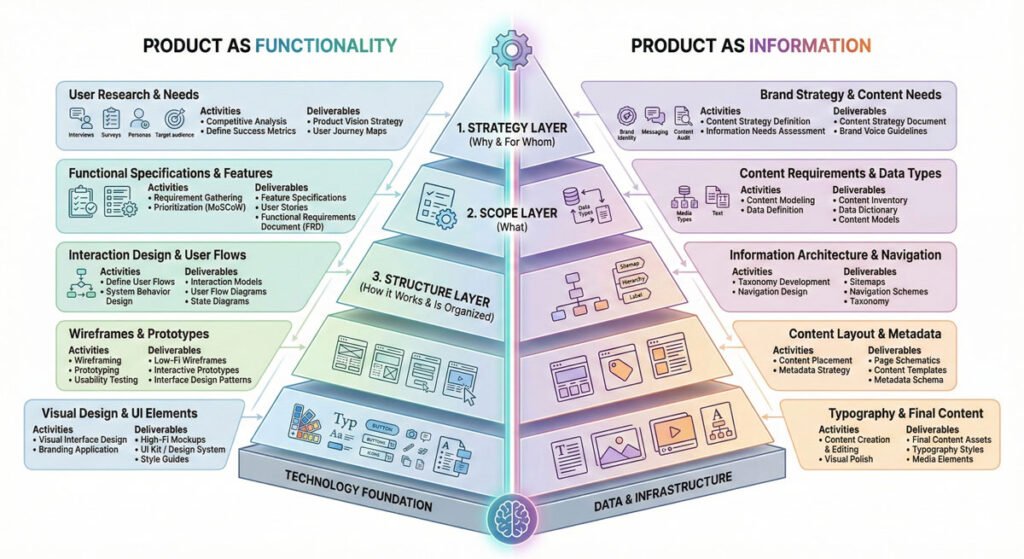
The Product Layer represents the vertical depth of product design—the different levels at which design decisions must be made. Understanding this framework, developed by Jesse James Garrett, founder of Adaptive Path, helps you see that a digital product has five main layers, regardless of whether it’s a SaaS application, mobile app, fintech solution or healthcare platform.
The Five Layers of Digital Product Design
The Five Layers of Digital Product Design:
Strategy Layer (The Foundation) – This foundational layer focuses on user needs and site objectives. Here, UX research, problem exploration, and definition take place. Designers conduct extensive user research to understand pain points, goals, and opportunities.
Scope Layer – Moving upward, this layer defines the features, functional requirements, and content specifications. Designers work on functional specs and content requirements, determining what the product will actually do.
Structure Layer – The middle layer involves Interaction Design (IxD) and Information Architecture (IA). Designers determine how tasks and flows should be orchestrated and how they should connect within the system.
Skeleton Layer – Here, designers create the wireframes, sitemaps, and low-fidelity prototypes that blueprint the user experience before high-fidelity design work begins.
Surface Layer – The final layer is where visual design comes to life. Designers apply colors, typography, and polished visuals to create high-fidelity designs ready for implementation.
The Functional vs. Informational Divide:
The model is split down the middle into two distinct perspectives:
Product as Functionality (left side): Work focuses on how the product works, responds, and connects. This is the technical and interaction-focused side.
Product as Information (right side): Work focuses on defining things, extracting insights, and making information visually meaningful and understandable.
Different designers may specialize in one side or layer, while others move fluidly across the entire model. As you advance in your career, these lines blur, and you may find yourself thinking bigger picture while still contributing to specific specialties.
Pillar 2: Product Stage – Timing and Context
Product Stage – Timing and Context
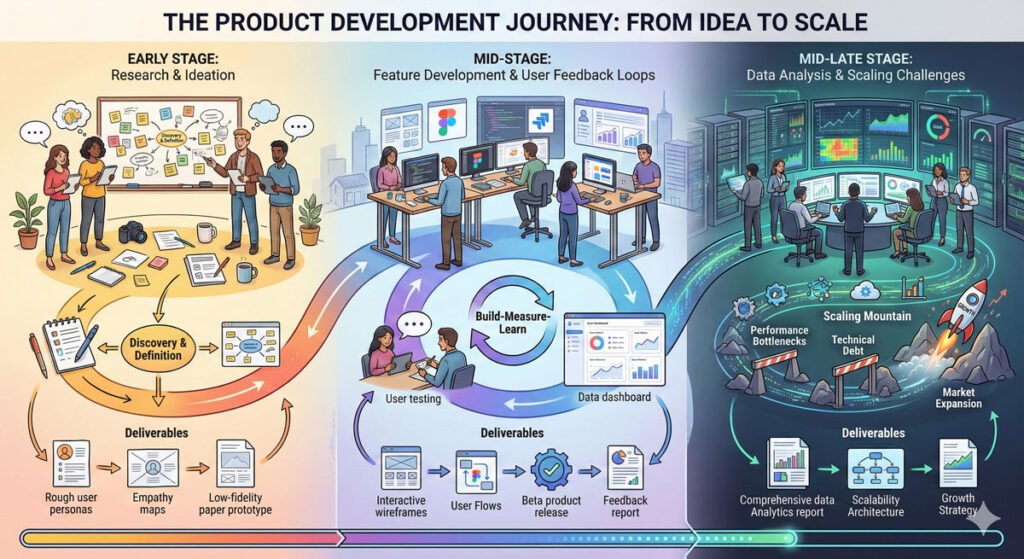
The Product Stage dimension acknowledges that products evolve over time, and the design challenges at each stage are fundamentally different. Recognizing which stage a product is in helps you understand what skills and expertise you’ll need to bring to the role.
Early Stage: Conception and Idea Validation
At the early stage, you’re forming the foundational idea and learning about your users’ potential problems. The design process starts from scratch, and neither the product nor its users exist yet. Your focus involves extensive user research, ideation, and problem definition. This stage rewards designers who are comfortable with ambiguity, speculation, and creative exploration.
Mid-Stage: Building Momentum and Features
During mid-stage development, you’re building a user base and actively receiving feedback. The primary design challenge involves adding new features or improving existing ones based on real user data. You’re validating assumptions against actual behavior, making this a stage where designers need strong research and iteration skills.
Mid-Late Stage: Scaling and Optimization
By the mid-late stage, you have substantial user data to analyze. The design focus shifts to making changes, fixing bugs, conducting usability testing, and dealing with scaling challenges. This stage requires designers who excel at data analysis, optimization, and managing complexity as products grow.
Different designers thrive at different stages. A designer who loves pure ideation and persona work might excel at early-stage start-ups, while another designer might prefer the analytical challenges of optimizing features for millions of users. Recognizing your preference helps you choose companies and projects that align with your strengths.
Pillar 3: Product Company – Organizational Context
Product Company – Organizational Context
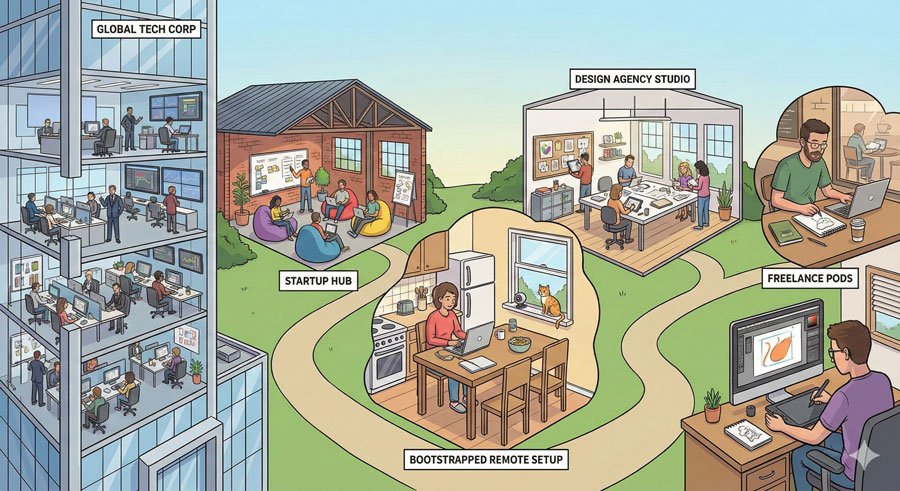
The third dimension is Product Company—recognizing that different organizations have completely different structures, business models, and design needs. Every company is unique with different business goals, constraints, and opportunities.
Types of Product Organizations:
Large B2B or B2C Companies – Established corporations with substantial resources, complex organizational structures, and often legacy systems to work within.
Small Startups – Lean, nimble organizations with limited resources but tremendous flexibility and impact potential.
Bootstrapped Companies – Self-funded ventures with significant constraints but complete autonomy over product decisions.
Agency Work – Design agencies serving multiple clients with different industries and needs.
Freelance/Consultant – Working independently with various clients and projects.
Your Own Product – Building and owning your own digital product.
The company type significantly influences your day-to-day work, the tools you’ll use, the teams you’ll work with, and the problems you’ll solve.
A designer at a Fortune 500 company might focus on scaling for millions of users and navigating organizational politics, while a start-up designer might be designing, building, and potentially even marketing their product.
How These Three Pillars Create Opportunity
The beautiful truth is that all three pillars blend together to create unique requirements and skill sets for job positions. This is why you’ll see completely different requirements and duties for the same title across different companies.
While this might seem confusing at first, it’s actually liberating—it means there’s room for you to carve out a unique space that matches your specific skills, interests, and working style.
Conclusion: Your Next Step
Now that you understand the landscape of product design—from the differences between roles to the structural frameworks that define the industry—you’re ready to explore how to build a career in this field.
The next article in this series will dive deep into the three critical areas you must master to successfully transition into product design: mastering your craft, defining yourself, and understanding your audience.
The product design industry is vast, diverse, and full of opportunity. Your unique background, perspective, and approach to problem-solving are exactly what the industry needs.
About the Author
Lalit M. S. Adhikari is a Digital Nomad and Educator since 2009 in design education, graphic design and animation. He’s taught 500+ students and created 200+ educational articles on design topics. His teaching approach emphasizes clarity, practical application and helping learners.
Aesthetic Tailoring and Professional Typography Standards
Master professional typography standards: typeface integrity, ligatures, small caps, punctuation refinement, and aesthetic tailoring details that elevate design.
Table of Contents
Aesthetic Tailoring: The Craft of Refinement
Aesthetic Tailoring: The Craft of Refinement
Adept typesetting involves studied principles and practice plus keen observation and treatment. Aesthetic tailoring is the final typesetting phase when designing with type for communication. Called microtypography, it ensures refined type settings. Projects become free of distractions and missteps that inhibit reading and message delivery.
All mediums and formats require enhanced sensitivity to typographic detail. Presented here are fundamental etiquette factors that offer simple methods to tailor type professionally.
Maintaining Typeface Integrity and Proportions
Maintaining Typeface Integrity and Proportions
The first rule of aesthetic tailoring is respecting the work of type designers. Use only available styles—posture, weight, and width—of chosen typefaces. These have been carefully considered and proportioned by type designers.
Never artificially alter typefaces by:
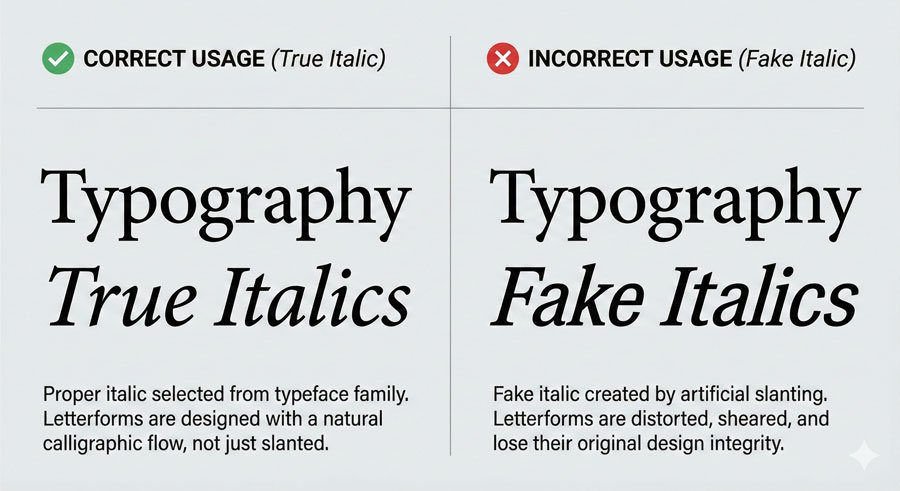
Creating “fake italics” by slanting roman styles
Adding strokes to vary type weight
Skewing or stretching letterforms to create narrow or wide alternatives
These modifications diminish proper proportions and typeface integrity. Instead, choose typefaces with stylistic ranges that meet your needs. Those fittingly selected and expressed with skilled treatment produce quality outcomes.
Select italic or oblique fonts from within the typeface. Serif typefaces typically have true italics—harmonious partners to romans with structurally different designs. Sans serifs traditionally feature obliques, which are aptly sloped versions of roman forms. Many contemporary sans serifs now include true italics.
Maintaining Baseline Relationships
Maintaining Baseline Relationships
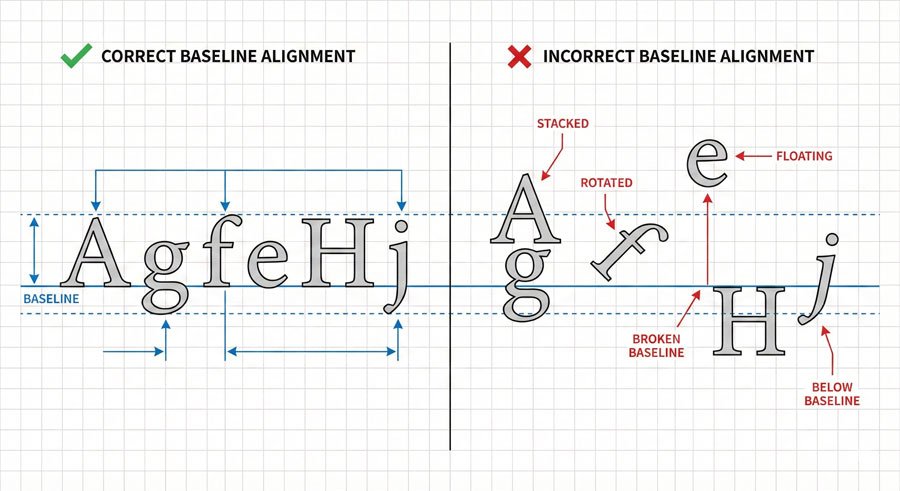
Baselines are imaginary lines on which letterforms, words, lines, and paragraphs sit. Letterforms maintain shared baselines, which support left-to-right reading patterns. This is fundamental.
Stacking type breaks the natural reading flow and creates visual chaos. If vertical presence is desired, shift orientation—type reads up or down with intact baseline relationships. Never stack letters vertically by breaking baseline alignment.
Proper baseline relationships create coherence and facilitate comfortable reading. Viewers shouldn’t struggle to find the reading path.
Optical Matching and Typeface Combinations
Optical Matching and Typeface Combinations
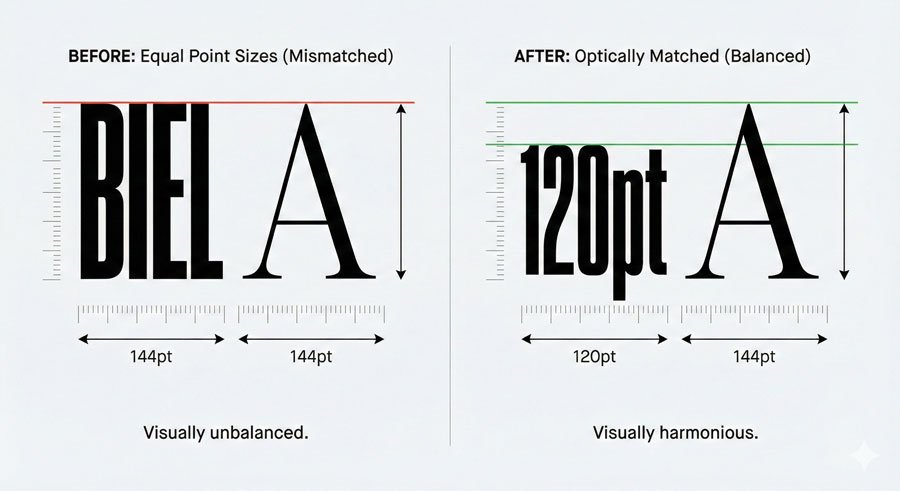
When setting multiple typefaces, carefully review size relationships between them. Match them optically, not by point size. At the same size, one typeface can look larger or smaller than another set side by side.
For example, a typeface with a tall x-height will appear larger than one with a small x-height at identical point sizes. Adjust point sizes until they appear optically equivalent.
Choose combinations that complement each other. Superfamilies simplify this process since they’re designed to work together. If combining unrelated typefaces, ensure they have distinct personalities that create clear contrast while maintaining harmony.
Avoid using typefaces that are too similar—if you’re using two sans serifs, make sure they look noticeably different. If you’re pairing serif and sans serif, ensure the contrast is clear.
Ligatures: Using Them Correctly
Ligatures: Using Them Correctly
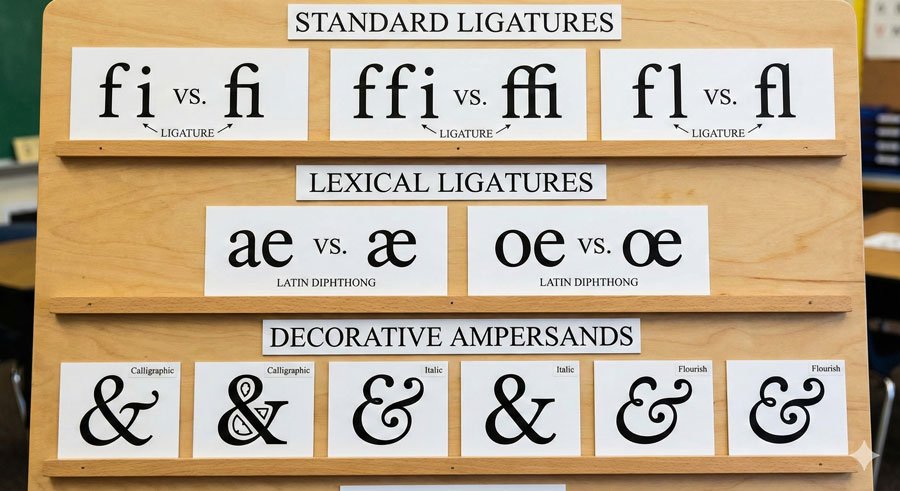
A ligature is the union of two or more characters into one. Varieties include:
Stylistic Ligatures – Resolve unwanted character collisions when certain letterforms combine. Common examples are ‘fi’, ‘ffi’, and ‘fl’. These deliver aesthetic refinement and should be used automatically by design software or manually applied.
Lexical Ligatures – Represent composite vowels such as ‘æ’ (aesc) and ‘œ’ (ethel). These are essential for proper language representation.
Discretionary Ligatures – Add stylistic grace with ornate or historical nuance. Options include ‘ct’ and ‘st’. Use selectively for special emphasis.
Become familiar with your typefaces and know ligature availability. If they exist, use them. If they don’t, be attentive to character collisions and kern carefully.
The ampersand (&) is another ligature, symbolizing the Latin word ‘et’ (meaning “and”). Some ampersand variations clearly echo their heritage as ‘e’ and ‘t’ ligatures; others vary indirectly with little resemblance.
Small Caps: Professional Alternatives to Full Capitals
Small Caps: Professional Alternatives to Full Capitals
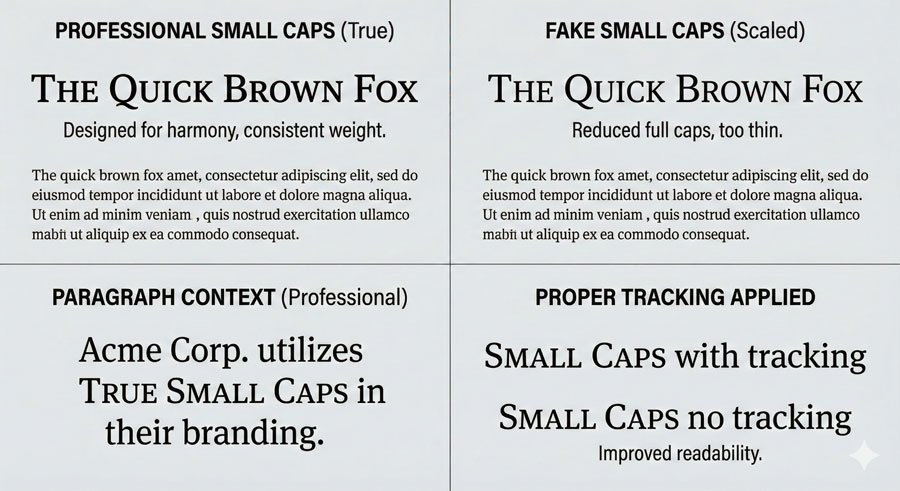
Small caps are uniquely designed uppercase letterforms that share with lowercase a similar weight and x-height (small caps are typically slightly taller). When elements such as acronyms and abbreviations appear in body text, use small caps instead of full capitals, which are optically too large next to lowercase letterforms.
Use small caps only if offered in selected typefaces—not all contain them. Simply reducing full caps to small-cap size makes them look too thin and narrow. “Fake small caps” are awkward and discordant.
Small caps also require open tracking to maintain readability and proportion. The extra space ensures the letterforms breathe and remain legible.
Punctuation Refinement
Punctuation Refinement
Proper punctuation usage includes several professional practices:
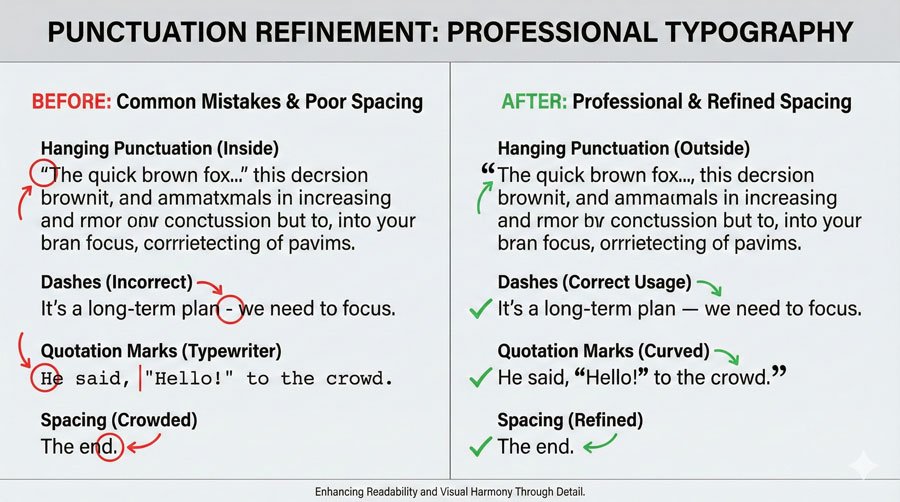
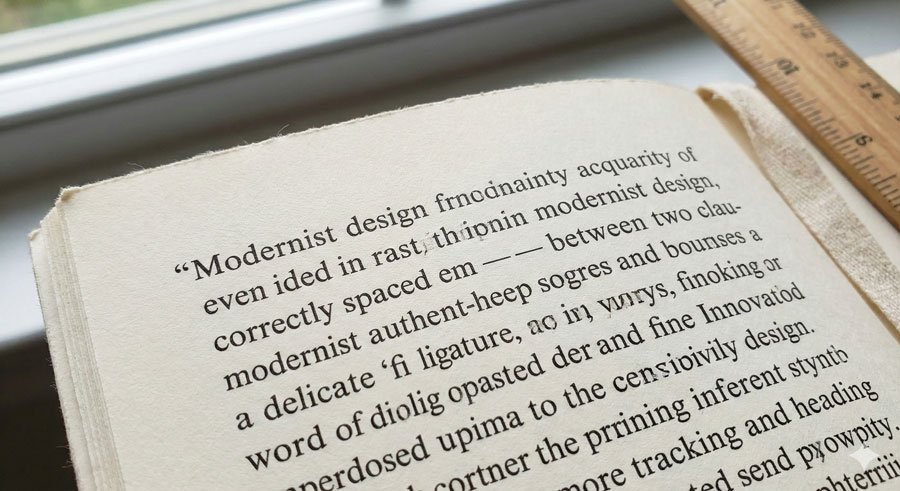
Apostrophes and Quotation Marks – Use true apostrophes and quotation marks (curved or angled, open or closed), not straight typewriter-style marks. Recognize the difference and ensure accurate use. Software “smart quotes” options ease this process through automatic replacement.
Hyphens and Dashes – Use hyphens (-) in breaking and compound words. Use en dashes (–) for dates (1900–2000), times (8:00–9:00), and page numbers (31–36). Use em dashes (—) to separate thoughts. Kern to avoid accidental collisions.
Hanging Punctuation – Slight, distracting spaces form when punctuation marks sit along flush edges. Manual positioning outside flush edges ensures optical alignment. Hanging punctuation applies to asterisks, apostrophes, commas, periods, and quotation marks.
Bullets and One Space Between Sentences – Bullets often appear too large next to type. Reduce point size and apply baseline shifts for optical balance. Use one word space between sentences—double spaces add unwanted white space.
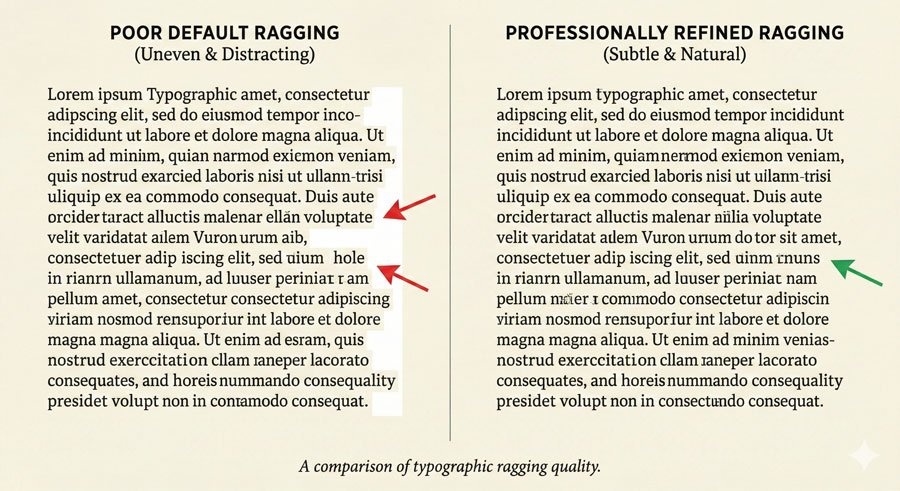
Paragraph and Line Edge Refinement (Ragging)
Paragraph and Line Edge Refinement (Ragging)
Ragging refines paragraph and line edges. Awkward angles, curves, holes, and shapes that appear through default settings require attention. Rags may be:
Active – with liberal in-and-out movement along the ragged edge
Unassuming – with subtle variation
Professional typography avoids extreme ragging where individual words create dramatic outward juts or inward dips. The irregular edge should feel natural and support reading flow, not distract from content.
Conclusion: Excellence Through Attention to Detail
Conclusion: Excellence Through Attention to Detail
The difference between adequate typography and excellent typography often lies in these micro-details. Viewers may not consciously notice proper ligatures, hanging punctuation, optical matching, or refined ragging—but they’ll notice when these elements are absent. They’ll feel the work is unrefined or amateurish.
Professional typography comes from respecting both the typefaces you work with and the readers who engage with your design. Aesthetic tailoring ensures your work looks polished, intentional, and professional.
About the Author
Lalit M. S. Adhikari is a Digital Nomad and Educator since 2009 in design education, graphic design and animation. He’s taught 500+ students and created 200+ educational articles on design topics. His teaching approach emphasizes clarity, practical application and helping learners.
Typesetting Factors – Space, Spacing and Hierarchy
Master typography spacing: kerning, tracking, leading. Learn alignment, hierarchy and how spacing creates visual impact and improves readability.
Table of Contents
The Power of Space in Typography
The Power of Space in Typography
In his book Typography: A Manual of Design, Emil Ruder wrote: “The oriental philosophers hold that the essence of created form depends on empty space. Without its hollow interior a jug is merely a lump of clay, and it is only the empty space inside that makes it into a vessel.”
This insight applies perfectly to typography. Typesetting happens in accord with the space in and around letterforms. Space is as much a physical presence as typographic marks themselves. Their collective relationship enlivens works. Space can change the look and feel of type, noticeably improving or weakening it.
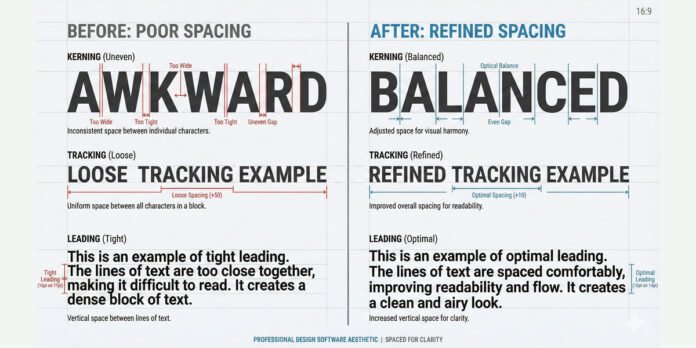
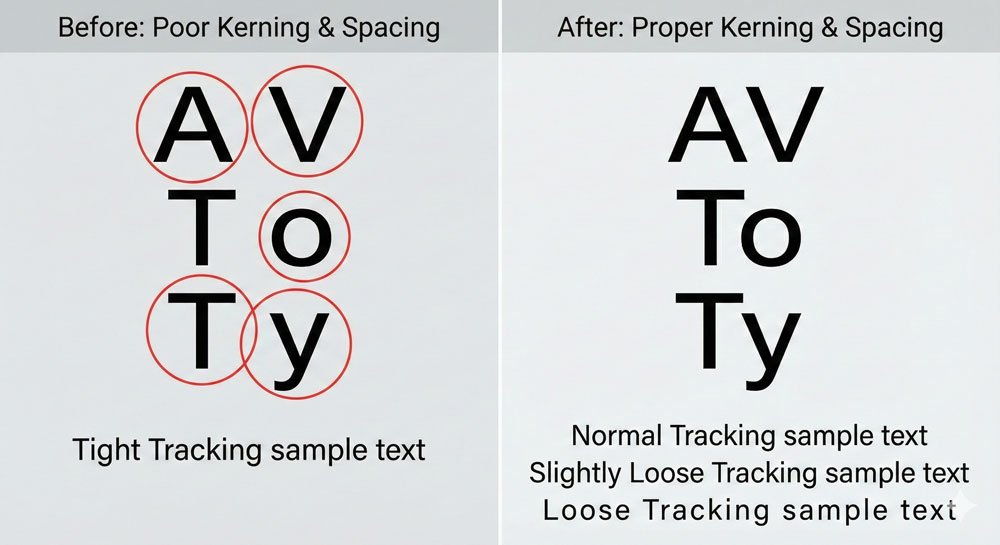
The act of spacing adjusts and refines the distances between characters, as well as the overall appearance of words, lines, and paragraphs. It includes three fundamental techniques: kerning, tracking, and leading (line spacing).
Typographic Color: How Spacing Creates Visual Impact
Typographic Color: How Spacing Creates Visual Impact
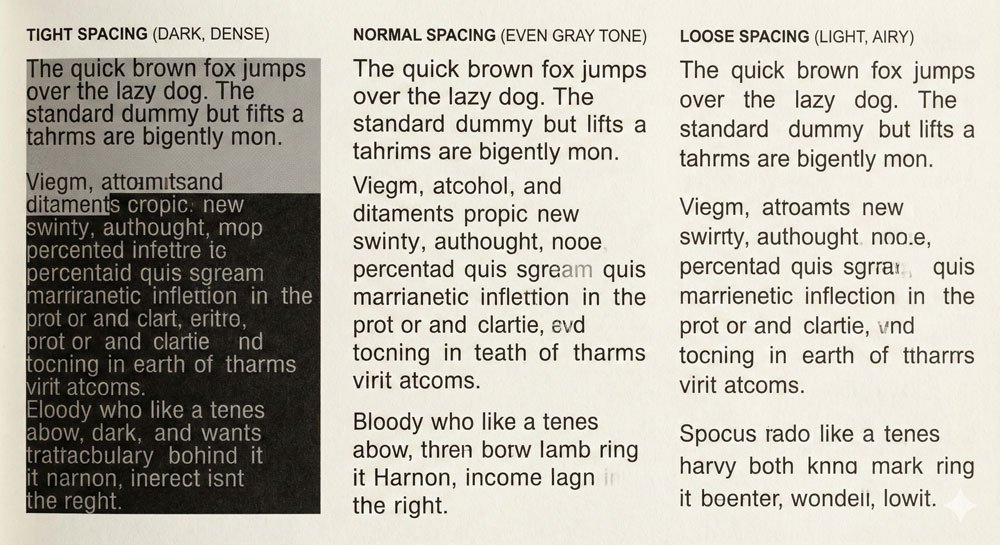
Typographic color refers to the overall lightness and darkness of type based on value, not hue. Light and dark values influence type appearance and hierarchy. Type lacking color is dull and flat; strong color enlivens works with variation and emphasis.
Text quantity, typeface selection, and space in and around letterforms—combined with well-articulated factors such as type size, style, and spacing—shape typographic color. Dark elements make strong imprints; light elements connote openness. Their interaction nurtures spatial depth, rhythm, and texture—all highly desirable typesetting attributes.
Tight spacing creates a blacker, more dramatic impression than loosely spaced type. Normal spacing typically means an even, gray field of text. Loose spacing creates an open, airy feeling. Each serves different purposes.
Kerning and Tracking: Character-Level Spacing
Kerning and Tracking: Character-Level Spacing
Kerning is the adjustment of space between specific character pairs. Some character combinations naturally create awkward gaps—think of ‘AV’, ‘To’, or ‘Ty’. Professional typefaces include kerning tables that automatically adjust spacing for problematic pairs. However, skilled designers often manually kern headlines and display text for optical perfection.
Kerning is optical, not mathematical. What looks correct visually determines good kerning. A kern pair that works at 72 points might not work at 48 points.
Tracking (also called letter-spacing) is uniform spacing adjustment applied across a range of characters. Unlike kerning which affects specific pairs, tracking affects all character relationships equally. Track can be:
Normal – the default spacing designed into the typeface
Loose – increased spacing for emphasis or open feeling
Tight – decreased spacing for condensed impression
Negative – tightly spaced, often used for display headlines
Small caps, for instance, require open tracking to maintain readability. Acronyms benefit from tracking adjustments. Tracking affects the overall typographic color and readability of passages.
Leading: The Vertical Dimension
Leading: The Vertical Dimension
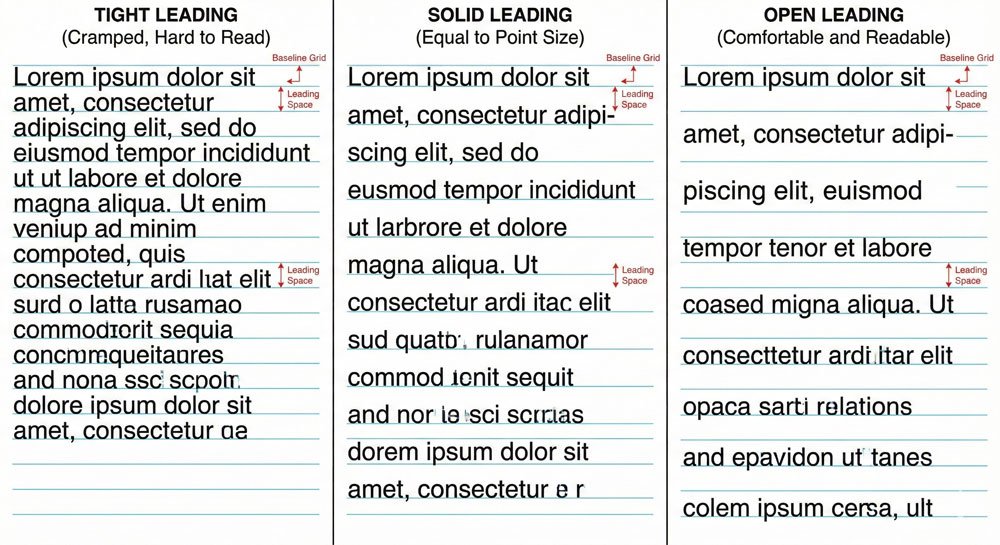
Leading (pronounced “ledding”) is the vertical distance from one baseline to the next, measured in points. The term derives from metal typesetting days when lead strips were set between lines of type to adjust vertical spacing.
Leading options are:
Positive leading – space between lines is greater than point size (most common, creates openness)
Solid leading – space between lines equals point size
Negative leading – space between lines is less than point size (can cause ascenders and descenders to touch or overlap)
Overlapping leading – an alternate method where one text fits into the line space of another
For most applications, positive leading is appropriate. Negative leading can work for display styles (24 point and up) but not body text. Body text (9 to 14 point) requires adequate leading for comfortable reading.
Leading depth is influenced by type size, x-height, and line length. Typefaces with tall ascenders and long descenders require more line spacing to avoid touching. Long lines need open leading because the eye travels farther from one line to another.
Alignment: Directing the Eye
Alignment: Directing the Eye
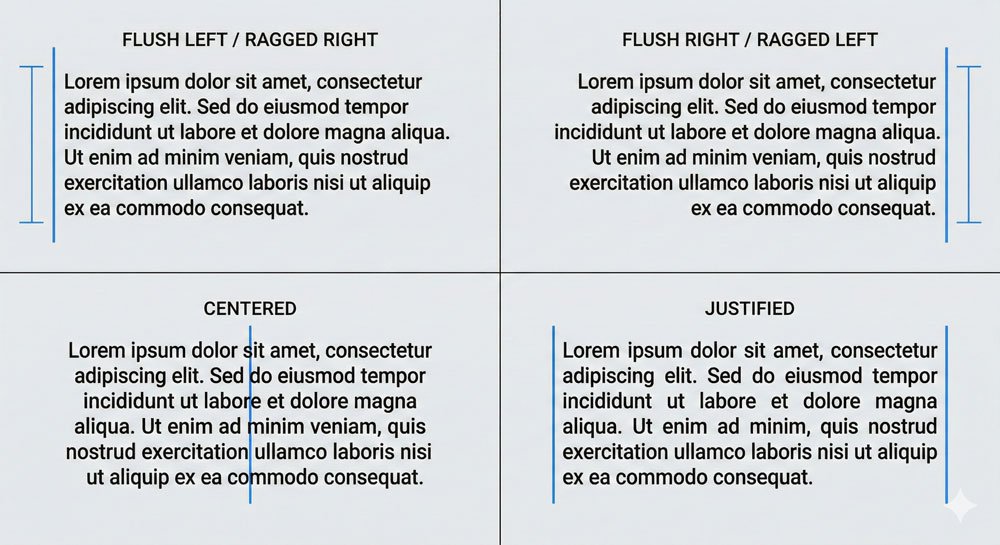
Typographic alignment refers to type configurations and dramatically affects readability and visual impression:
Flush Left / Ragged Right (FL/RR) – The most common and comfortable alignment. Starting points of lines are fixed on the left, creating a consistent reading entry point. Ragged right edges create irregular patterns but support natural left-to-right reading patterns.
Flush Right / Ragged Left (FR/RL) – Works well for words or lines, creates contrast with flush-left text when juxtaposed. Ragged left edges create irregular starting points that make reading paragraphs difficult.
Centered (C) – Connotes formality and classic typography. Useful in limited settings with minimal text (book title pages). Centering rarely applies to continuous text.
Justified (J) – Creates clean lines and strong left and right alignment edges. However, variable word spaces that flex in width can cause rivers (unsightly gaps in justified text). Justified paragraphs require careful attention to avoid readability problems.
The choice of alignment dramatically influences how readers engage with text. Always consider alignment in relationship to your content and medium.
Creating Hierarchy Through Variation
Creating Hierarchy Through Variation
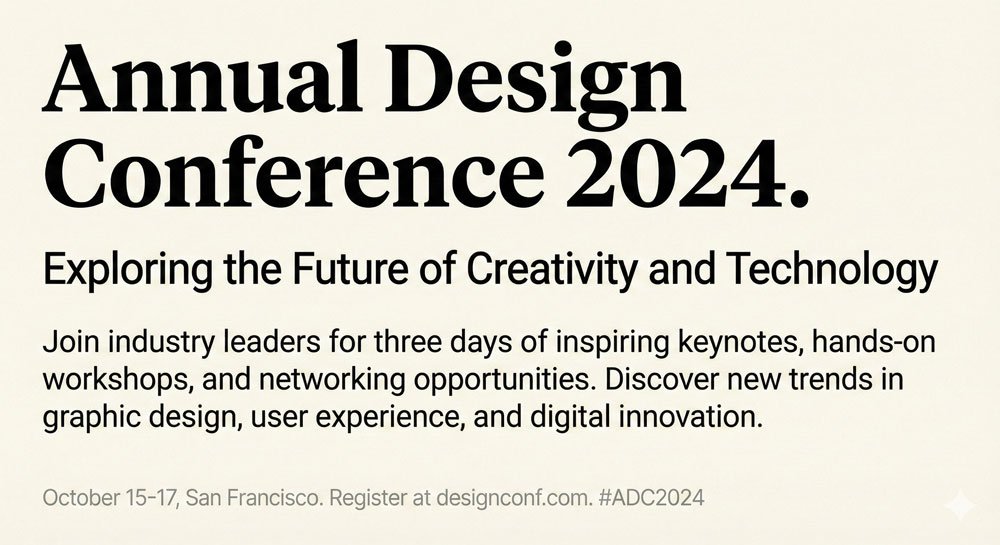
Effective typographic hierarchy emerges through variation in:
Point size – Dramatic size changes create immediate emphasis
Weight – Bold vs. regular creates visual distinction
Width – Condensed vs. extended creates contrast
Style – Roman vs. italic creates emphasis
Case – Uppercase vs. lowercase affects prominence
Color – Darker values create emphasis; lighter recede
Position – Spacing and placement direct attention
Orientation – Horizontal vs. vertical creates contrast
Spatial factors support hierarchy: spacing (tracking, kerning, leading), orientation shifts (horizontal, vertical, diagonal), and position changes. Graphic factors including line, shape, and color also support hierarchy.
The goal is creating visual interest while maintaining reading order. Viewers should understand which information is primary, secondary, and tertiary through your typographic choices.
Conclusion: Mastery Through Practice
Conclusion: Mastery Through Practice
Spacing and hierarchy require both learned principles and optical sensitivity. What looks correct visually most often stands true. Skilled typesetting comes from practice, observation, and refinement.
As you work, pay attention to how spacing choices affect readability and visual impact. Notice what works in professional design. This critical observation, combined with foundational knowledge, develops expertise.
About the Author
Lalit M. S. Adhikari is a Digital Nomad and Educator since 2009 in design education, graphic design and animation. He’s taught 500+ students and created 200+ educational articles on design topics. His teaching approach emphasizes clarity, practical application and helping learners.
On Typefaces – Categories, Selection, and Combination
Learn typeface categories: Humanist, Old Style, Transitional, Modern serifs, plus Slab, Grotesque, Geometric and Humanist sans serifs. Master selection and pairing.
Table of Contents
The Typeface vs. Font Distinction
The Typeface vs. Font Distinction
The terms “typeface” and “font” are frequently used interchangeably in modern practice, though technically they have distinct meanings. A typeface is the consistent design or distinct visual form of a type family.
It’s a cohesive system of related shapes created by a type designer, where characters including letterforms, numerals, and punctuation share formal attributes.
Historically, a font was a complete character set of a typeface in one point size and style—for example, 12-point Centaur roman.
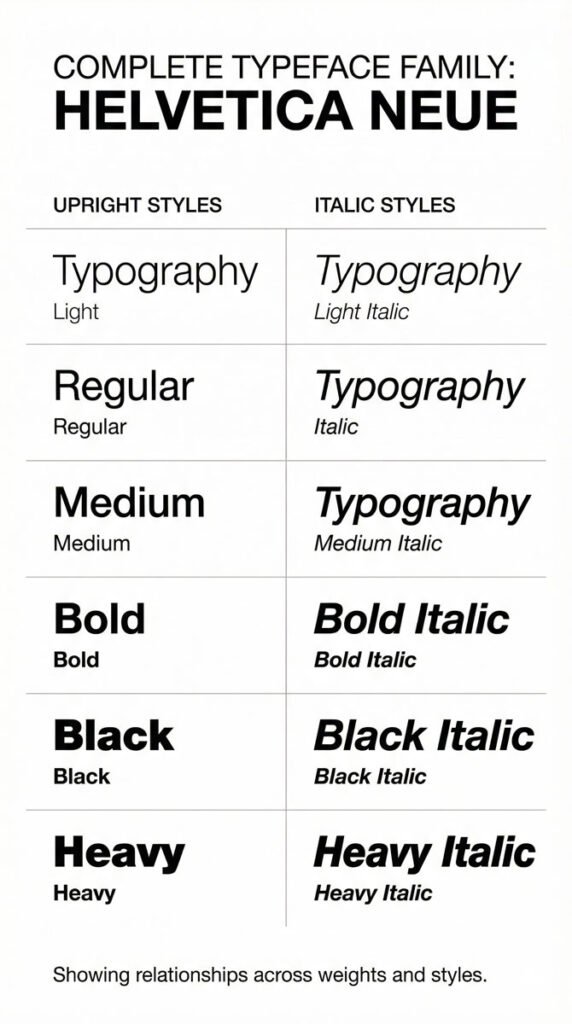
The term can also describe family members comprising different weights and styles: light, regular, bold, italic. In digital practice, a font refers to a computer file that makes a typeface available for use and production.
Understanding this distinction helps you speak more precisely about typography and respect the work of type designers who create these systems.
Why Typeface Selection Matters
Why Typeface Selection Matters
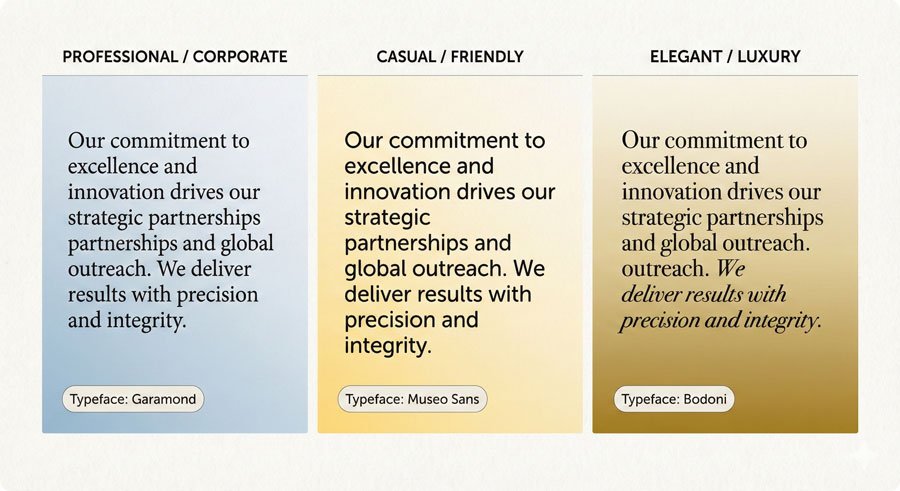
Typefaces influence communication through both appearance and legibility. Aesthetics provide first impressions and express personalities—friendly, professional, sweet and youthful, masculine, utilitarian. Connotation (implied meaning) inherent in typefaces plays a significant role in how your audience perceives your message.
Legibility refers to the recognition of single characters and their relationships when set side by side. Type designers carefully construct characters and pay special attention to space—particularly counters (enclosed white space in characters) and sidebearings (the built-in space on the left and right of characters). Character shape plus white space aid letterform recognition. Legibility relies on the invisible presence of space.
Apt typefaces directly engage viewers and send convincing messages. When you choose a typeface that aligns with your content, medium, and audience, you create work that feels intentional and compelling.
The Major Typeface Categories
The Major Typeface Categories
Serif Typefaces
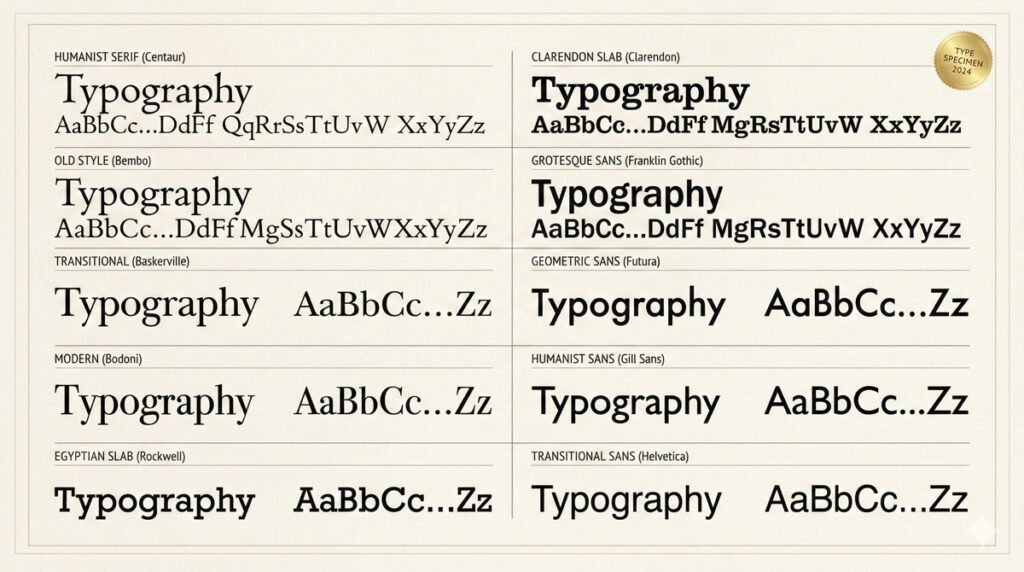
Serif typefaces are organized into four historical and formal categories:
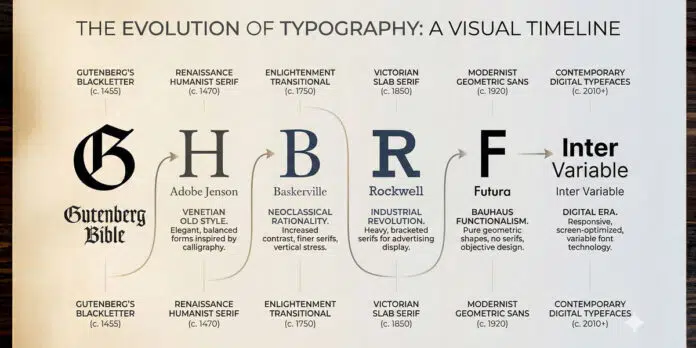
Humanist Serif – The original roman typefaces, appearing in the fifteenth century. Inspired by Italian handwriting called “lettera antica,” they feature low thick-to-thin stroke contrast, bracketed serifs, angled crossbars on lowercase ‘e’, and oblique stress. Examples include Centaur and Vendetta. These typefaces feel elegant and historical.
Old Style Serif – More refined than Humanist serifs with smoother, rounder forms. Appearing in the fifteenth and sixteenth centuries, they show medium thick-to-thin stroke contrast and horizontal crossbars on lowercase ‘e’. Examples include Bembo and Galliard. These typefaces balance elegance with readability.
Transitional Serif – Appearing in the eighteenth century, inspired by engraving techniques. They feature medium to high thick-to-thin stroke contrast, sharper bracketed serifs, and taller x-heights. Baskerville is the archetypal example. These typefaces represent a bridge between historical and modern forms.
Modern Serif – Also called Didone serifs, these appear in the eighteenth century with very high thick-to-thin stroke contrast, vertical stress, and hairline unbracketed serifs. Bodoni and Walbaum are classic examples. These typefaces feel formal and dramatic.
Slab Serif Typefaces:
Egyptian – Appearing in the nineteenth century, featuring very low or uniform stroke contrast with heavy, square unbracketed serifs. Rockwell is the archetypal example. Originally designed for advertising, contemporary slabs are more versatile.
Clarendon – Also appearing in the nineteenth century, featuring bracketed serifs and low thick-to-thin stroke contrast with distinctive ball terminals. Clarendons appear more refined than Egyptians.
Sans Serif Typefaces
Grotesque – The first commercially widespread sans serifs, appearing in the nineteenth century. They show slight thick-to-thin stroke contrast with curved strokes ending at angles. Akzidenz-Grotesk is archetypal. These feel utilitarian and straightforward.
Geometric – Appearing in the twentieth century, based on geometric shapes (circles, squares, triangles). They feature uniform stroke contrast and vertical stress. Futura is the prime example. These feel modern and rational.
Humanist Sans – Taking inspiration from Humanist serifs with subtle thick-to-thin contrast and calligraphic influence. Gill Sans is archetypal. These feel approachable and refined.
Transitional Sans – From the mid-twentieth century onward, refreshed Grotesques with uniform stroke contrast and vertical stress. Helvetica and Univers are classic examples. These feel neutral and universal.
Legibility vs. Illegibility: When to Break the Rules
Legibility vs. Illegibility: When to Break the Rules
Some typefaces intentionally challenge legibility. These are typically designed for special purposes—display faces for posters, experimental faces for conceptual work, or decorative faces for specific contexts. For these typefaces, artistry and expression drive design rather than utility and communication.
This is important: understand the rules before you break them. Use legible typefaces for body text where readers need to absorb information comfortably. Reserve challenging typefaces for headlines, display use, or contexts where concept trumps comfort.
The craft of typography includes knowing when conventions serve your purpose and when breaking them creates more compelling communication.
Superfamilies: Comprehensive Typographic Systems
Superfamilies: Comprehensive Typographic Systems
Superfamilies are full-bodied typeface families that can include serif, semi-serif, sans serif, semi-sans, and slab serif faces. They typically feature extensive weights and widths, as well as optical styles. Unified by concept and form, superfamilies provide complete typographic systems ideal for complex projects.
Type designer Martin Majoor’s Nexus (literally meaning “connection” in Latin) contains serif, sans serif, and slab serif typefaces. He describes it as “three typefaces, one form principle”—the allied threesome stems from one design concept driving its development.
Otl Aicher’s Rotis contains serif, semi-serif, sans, and semi-sans faces that transition effortlessly from one to the next. Superfamilies are comprehensive systems fit for wide-ranging, particularly complex, typographic projects.
Using a superfamily simplifies typeface selection. You know the faces work together harmoniously—that compatibility is built in.
Typeface Selection Considerations
Typeface Selection Considerations
When selecting typefaces for a project:
Review in context – Print samples. View on multiple screens and resolutions. Mock up three-dimensional environments. What looks great on screen might not translate on paper.
Match optically, not mechanically – When combining typefaces, match them visually rather than by point size. One typeface can look larger or smaller than another at identical point sizes.
Consider the medium – Environmental signage requires legibility at a distance. Luxury packaging might demand elegance and refinement. Web typography must perform across devices.
Respect typeface integrity – Use typefaces as designed. Don’t artificially stretch, squash, or modify them. Build a quality typeface library of faces with stylistic ranges that meet your needs.
Understand personality – Typefaces have distinct voices. Humanist serifs feel warm and historical. Geometric sans serifs feel modern and rational. Match personality to message.
Conclusion: Building Your Typographic Toolkit
Conclusion: Building Your Typographic Toolkit
Excellence in typeface selection comes with experience. Test faces in your projects. Create specimens with ranges of settings suited to specific texts and mediums. No matter the situation, always review typefaces in context. Good typefaces fittingly selected and expressed with skilled treatment yield beautiful results.
About the Author
Lalit M. S. Adhikari is a Digital Nomad and Educator since 2009 in design education, graphic design and animation. He’s taught 500+ students and created 200+ educational articles on design topics. His teaching approach emphasizes clarity, practical application and helping learners.